MiniMax H3 Image-to-Video Prompting Guide: Alignment Lines, Keyframes, and 3 Example Prompts
MiniMax H3 animates a still image and scores it in the same pass. Give it one picture and the clip starts there. With a second image it has somewhere to arrive, and the prompt becomes a description of the route.
The prompt format carries over from text-to-video, so the three fields, the shot markers and the dialogue tags work exactly as they do there. If you have not written an H3 prompt before, start with the MiniMax H3 prompting guide and come back. Image mode adds one mandatory line at the top of the prompt and changes what you spend your words on. Those two things are what this guide covers.
The two modes you have
First frame. Your image is where the clip begins. Everything after frame 0 is invented from your description, and the model is free to bring in people and objects that were never in the picture.
First and last frame. Your two images are the endpoints and the prompt describes the route between them. H3 does not cross-fade here. It works out a physical cause for the change and animates that.
There is no last-frame-only mode on deAPI. Every request needs a first frame image, so a second image is always a destination.
The alignment line
This is the line that decides whether H3 treats your picture as a frame or as a loose style reference. It goes first, followed by one blank line, then integrated_multimodal_description and the rest.
The wording is fixed. Copy it and change the numbers.
Single image, used as the first frame:
For the target video, at 0.00 seconds into the target video, <Picture 1> (from [Shot 1]) is fully referenced.
Two images, first and last frame:
How the reference pictures align with the target video — Picture 1 (from Shot 1) aligns with the 0.00-second mark of the target video; Picture 2 (from Shot 1) aligns with the 5.17-second mark of the target video.
Copy the second one character for character, long dash included. H3 was trained on that exact string, so paraphrasing it or tidying the punctuation weakens the alignment.
The number at the end is where most generations go wrong. It has to be your clip duration to two decimal places, and duration on deAPI comes from your frame count divided by 24.
| frames | duration | write |
|---|---|---|
| 56 (minimum) | 2.3333 s | 2.33 |
| 72 | 3 s | 3.00 |
| 96 | 4 s | 4.00 |
| 124 (default) | 5.1667 s | 5.17 |
| 144 | 6 s | 6.00 |
| 192 | 8 s | 8.00 |
| 240 | 10 s | 10.00 |
| 243 (maximum) | 10.125 s | 10.12 |
The odd-looking 5.17 in deAPI’s sample prompts comes from the 124-frame default. Ask for 144 or 192 frames and your alignment line gets a round number, which is one less thing to get wrong. Any integer between 56 and 243 is accepted, so frames=137 is a valid request if you want it.
While you are counting frames, set a seed. It is required on this endpoint, and omitting it returns a 422 that catches most people on their first call.
Spend your words on motion
The scene arrives with the image, so your words go somewhere else.
H3’s text encoder is Qwen3-VL-32B, which reads the picture directly. Every sentence you spend describing what is already visible buys you nothing, and it costs you the sentences you could have spent on movement. This is the most common way a good image produces a nearly static clip.
The budget goes up rather than down. MiniMax’s own reference-image example runs 704 words against 377 for the equivalent text-only case, because an image gives the model more to stay consistent with over time.
In first-frame mode that means one or two anchor sentences and then motion for the rest. In two-frame mode you can drop the static description almost entirely, because both endpoints are already on screen.
First frame: anchor, then move, then land
The anchor sentence pins what has to survive the clip. Name appearance, clothing, colours, key objects and where things sit relative to each other. After that sentence, everything is motion.
New subjects can walk in. Your image fixes frame 0 and nothing else, so a hand entering from the right, a second person, a passing car are all fair game. Ask for them explicitly and H3 will bring them in without disturbing the composition.
Text in the image needs quoting. A sign, a label, a phone screen, all of it goes into your description in double quotation marks, verbatim. Unquoted text tends to drift into approximate glyphs partway through the clip.
Two frames: write the road
Four rules cover almost everything here.
Keep it to one shot. Both pictures belong to [Shot 1]. A cut breaks the interpolation, because H3 is solving for a continuous physical change and a cut tells it to stop solving.
Never write two static descriptions. “The notebook is closed. Then the notebook is open.” gives the model two states and no transition. Write the arc: the hand arrives, the fingertips settle on the cover, the cover lifts, the pages fan and settle flat.
Close with a landing sentence. The last sentence of your description should name what has to be true at the end: position, spacing, angle, lighting, composition. This is what pulls the final frames onto your second image instead of near it.
Generate the pair from one source. Take your first image, run it through Qwen Image Edit Plus or FLUX.2 Klein with a single instruction, and use the result as the last frame. Same lighting, same camera, one thing changed. Two unrelated photographs ask for an impossible transformation and you get a morph.
For a loop, pass the same image as both frames, write actions that return to where they started, and set non_diegetic_music to a repeating figure or N/A.
Preparing the input image
Output is 1344×768 today, and a non-matching input gets squashed into that frame rather than cropped or letterboxed, which destroys proportions and makes faces read wrong. Crop or compose at 1344×768 before you upload. More sizes are on the way, including vertical video. For now, cropping is the one preparation step that decides whether your clip is usable.
Light faces from the front or three-quarter, because a face half in shadow at frame 0 stays half in shadow at the end. Avoid baked-in motion blur, which H3 reads as texture and can smear across the whole clip. Leave room in the direction your action travels, since the model holds your framing instead of recentring for you.
Three prompts you can copy
1. Portrait with one line of dialogue
Written at full length so you can see the scale. First-frame mode, 144 frames.
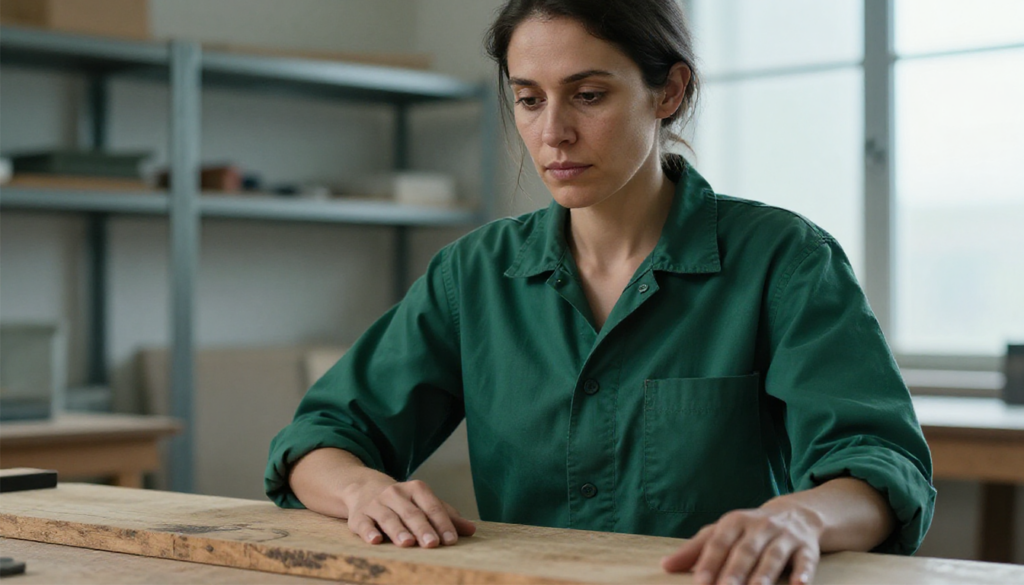
For the target video, at 0.00 seconds into the target video, (from [Shot 1]) is fully referenced.
integrated_multimodal_description: [Shot 1] Live-action, cinematic, a medium close-up holds the woman (S1) exactly as framed in , preserving her dark-green work shirt with the sleeves rolled to the elbow, the loose strands of hair at her temple, both hands resting flat on the bare wood of the workbench across the lower third of frame, and the cool overcast light falling from the tall window at frame right. The depth of field stays shallow, with the shelving behind her soft and unreadable. For the first second she stays as she is, eyes down on the bench, hands still. Her shoulders drop slightly as she exhales. She lifts her gaze from the bench to the camera in one unhurried movement, her hands remaining flat on the wood, and with a low, tired, faintly amused voice she says:
[English] Twelve hours. It was the wiring the whole time.
She holds the look for a beat after the line, then glances down at the bench again and the corner of her mouth lifts. Throughout, dust drifts slowly through the window light behind her and a loose strand of hair moves faintly in the air from an unseen vent. The camera pushes in with small amplitude at slow speed across the full duration, ending marginally tighter on her face than it began, and holds on the last beat without cutting.overall_soundscape: A quiet workshop room tone with a faint electrical hum from somewhere off-frame. Fabric shifts against the bench as her shoulders drop, and a single soft exhale precedes the line.
non_diegetic_music: N/A
The anchor is one long sentence. Everything after it is movement, delivery and timing, and the line of dialogue is 9 words for a 6-second clip, which leaves room to breathe at both ends.
Note how little the body actually asks for: an exhale, a change of eyeline, a beat, a half-smile. Small movements from a still starting pose are where H3 is most reliable. Hands manipulating a small object, on the other hand, are where generated video still falls apart, so keep the input pose simple and let the performance carry the shot.
2. Transformation between two frames


The pair is a photograph of a closed notebook on a desk, plus the same photograph run through Qwen Image Edit Plus with the instruction “Open the notebook so both pages lie flat on the desk”. 124 frames.
How the reference pictures align with the target video — Picture 1 (from Shot 1) aligns with the 0.00-second mark of the target video; Picture 2 (from Shot 1) aligns with the 5.17-second mark of the target video.
integrated_multimodal_description: [Shot 1] Live-action, cinematic, the desk begins in the exact framing established by Picture 1, with the closed notebook and the ceramic mug in place under the morning window light. A hand enters from the right side of frame, settles its fingertips on the front cover of the notebook, and lifts the cover upward. The cover rises through a continuous arc, the pages beneath it fanning briefly before they settle flat, and the hand smooths the open spread with one pass of the palm before withdrawing out of the right edge of frame. Steam continues to rise from the mug throughout and dust motes turn slowly in the window light. Over the last second the notebook position, page spread, mug placement, lighting and overall composition settle precisely into the arrangement established by Picture 2, and the frame holds still.
overall_soundscape: Quiet interior room tone with faint birdsong beyond the glass. Paper rustles and pages settle with a soft slap against the desk, and skin brushes across paper as the palm smooths the spread.
non_diegetic_music: N/A
Nothing in that prompt describes a sleeve or a wristwatch. H3 put both in the middle of the clip anyway, because a notebook does not open itself and the model invents whatever the change requires.
3. Loop
Same image as first and last frame. 240 frames, and the clip repeats without a visible jump.
How the reference pictures align with the target video — Picture 1 (from Shot 1) aligns with the 0.00-second mark of the target video; Picture 2 (from Shot 1) aligns with the 10.00-second mark of the target video.
integrated_multimodal_description: [Shot 1] Live-action, cinematic, the still life holds the framing established by Picture 1 for the full duration: the ceramic mug on the wooden desk, the window beyond it, the morning light across the grain. Steam rises from the mug in a thin ribbon that curls, thins out and re-forms at the same rate throughout. Dust motes drift upward through the window light, turn, and settle back toward the desk surface. The light on the wood brightens gradually as cloud passes, then returns to its starting value over the final two seconds. The camera remains a static shot. Over the last second every element returns to the exact arrangement of Picture 1: steam volume, mote distribution, light level and shadow position.
overall_soundscape: Quiet interior room tone with faint birdsong beyond the glass, steady and unchanging across the full duration.
non_diegetic_music: N/A
Naming what has to return, element by element, is what closes the gap between the final frame and the first.
Common mistakes
| Symptom | Cause | Fix |
|---|---|---|
| Image treated as a style reference | Alignment line missing or reworded | Copy the exact line for your mode, keep the blank line after it |
| Last frame never reached | Duration in the alignment line does not match frames ÷ 24 | Recalculate to two decimals |
| Two frames produce a morph | Images irreconcilable, or both described statically | Generate the pair from one source, rewrite the body as a motion path |
| Clip barely moves | Word budget spent describing the image | Cut the anchor to two sentences, spend the rest on action |
| Model invents its own scene | Prompt too short or unstructured | Use the field format, aim for 400 to 700 words |
| Identity drifts after a second | Anchor sentence too vague | Name wardrobe, colours, objects and spatial relationships |
| Everything looks horizontally stretched | Input was not 1344×768 | Crop or compose to 1344×768 before uploading |
| 422 on a valid-looking request | seed omitted | Send a seed |
| Narration animates a mouth | Voiceover clause missing | Use says in an off-screen voiceover plus an explicit lips-closed statement |
| Text in the image degrades | Not quoted in the prompt | Put it in double quotation marks verbatim |
Tips
Let the booster write your first draft. deAPI’s prompt enhancer has a guide for H3 image-to-video and produces a correctly formed alignment line and all three fields for a fraction of a cent. It runs around 130 words, well under the 400 to 700 H3 wants, so treat it as scaffolding and thicken it yourself. It also writes the first-frame alignment line every time, including when you hand it a last frame image, so two-frame prompts need that line by hand. If you want the same button inside your own app, we wrote up how to add it.
Iterate at 56 frames. Fix the seed, change one field, regenerate. Short clips are enough to tell you whether the composition holds and whether the motion reads, and you save the long generation for the version you intend to keep.
Pin identity by position. “On the left”, “in the centre” survives the clip better than clothing descriptions on their own, particularly once a second figure enters frame.
Need more than 768p? Chain the finished clip through an upscaler. Our video upscaling guide covers RealESRGAN and FlashVSR.
Start generating
MiniMax H3 image-to-video runs on the same API key as everything else on deAPI, with $5 in free credits and no card required. Crop one image to 1344×768, put the alignment line at the top of your prompt, and the first clip comes back with the audio already on it.