LTX-2.3 Video Generation prompt guide Guide
Most AI video models take a text prompt and guess what motion looks right. LTX-2.3 listens. Lightricks’ 22-billion-parameter DiT model accepts audio alongside a text prompt and generates video synchronized to the waveform. A character’s lips match the spoken words down to individual phonemes, while a drummer’s arms land on every snare hit the audio contains.
Through deAPI, LTX-2.3 runs in three modes: text-to-video, image-to-video, and audio-to-video. This guide walks through prompt structure and technical parameters across all three, with six worked examples and code you can run today.
Three Ways to Generate Video
Each mode takes a different input and solves a different problem.
| Mode | Input | Endpoint | Best for |
|---|---|---|---|
| Text-to-Video | Text prompt | POST /api/v2/videos/generations | Establishing shots, concept scenes, motion from scratch |
| Image-to-Video | Image + text prompt | POST /api/v2/videos/animations | Animating portraits, product shots, existing artwork |
| Audio-to-Video | Audio file + text prompt | POST /api/v2/videos/audio-syncs | Lip-sync dialogue, music videos, sound-reactive scenes |
All three share the same core parameters: 24 fps fixed, 2-10 seconds of output (49-241 frames), resolutions up to 1024×1024.
The strongest combination feeds both an image and audio into the audio-sync endpoint. The image pins the character’s appearance while the audio controls every mouth movement and gesture. More on that later.
How to Write Prompts for LTX-2.3
LTX-2.3 responds best to prompts written as a single flowing paragraph in present tense. Think of it as writing a shot description for a cinematographer – include the subject, environment, action, camera behavior, lighting, and style, but weave them together naturally rather than separating them into labeled sections.
Aim to cover these elements in every prompt: the shot type and camera position, the scene and lighting, the core action as a natural sequence, character details expressed through physical cues, camera movement, and any audio description.
Write in natural prose, not keyword lists. “A 35-year-old woman with dark hair speaks to the camera in a modern office” works better than “woman, dark hair, office, talking, 35yo.” The model parses sentences like a language model – word order sets priority, so lead with the most important visual element and be specific about physical details.
Target prompt length: 60-200 words. Below 60 the output tends toward generic motion, while prompts closer to 200 give the model enough detail to stay coherent across clips over 5 seconds.
Two rules that apply across all modes:
- Describe micro-motions explicitly. Without instructions like “subtle head nods” or “natural blinks,” faces tend to freeze into a mannequin stare. The model generates motion that you ask for – silence in the prompt means stillness in the video.
- Match camera movement to content. Static or slow-dolly shots work best for dialogue and close-ups. Save dynamic camera work for wide establishing shots and performances where the face isn’t the focus.
Text-to-Video: Prompts and Examples
Text-to-video generates a scene entirely from your description. The model builds everything from the prompt – appearance and motion alike – which makes it the right choice for establishing shots and atmospheric scenes where creative control matters more than visual consistency.
Example 1: Cinematic Establishing Shot
Prompt:
A wide shot of a neon-lit Tokyo alley at night in the rain. Dozens of glowing signs in Japanese kanji reflect off the wet asphalt in streaks of pink, blue, and orange. Steam rises from food stalls on both sides, warm yellow light spilling across the pavement. The camera drifts forward slowly down the empty alley, neon signs sliding past on both sides, puddles catching the colors as the angle shifts. Rain streaks through the glow of each sign. The audio is heavy rain on pavement, a low electrical hum from the neon, and distant city traffic. 35mm anamorphic, Kodak Vision3 500T, heavy grain, shallow depth of field.
Why it works: One movement, one direction – the camera drifts forward and everything else follows from that. No characters to animate, no action changes mid-clip. The neon reflections on wet asphalt give the model concrete lighting interactions on every surface, and the parallax of signs sliding past sells the forward motion. Naming a specific film stock steers the color grade more precisely than adjectives like “cinematic” or “moody.”
Example 2: Two-Person Dialogue Scene
Prompt:
A cozy European cafe on a rainy afternoon, seen from behind a 30-year-old woman in a rust-colored sweater. She sits at a window-side table across from a 40-year-old man in a navy blazer who leans forward over his coffee cup. Steam rises between them, and rain streaks down the window behind. The man gestures with his right hand, “So I told him – this is not how any of this works.” He pauses, shakes his head. The woman leans back, arms crossed, a smirk forming. “And he believed you?” The man exhales, looks down at his cup. “That’s the thing. He didn’t.” She laughs softly and reaches for her coffee. The camera dollies in gently over the clip duration on a 35mm lens. Soft overcast daylight from the window serves as key light, a warm pendant lamp above adds orange fill. The audio is their voices with cafe ambient – clinking cups, muffled conversation, rain against glass. 35mm film grain, muted desaturated palette, shallow depth of field.
Why it works: The dialogue is broken into short phrases with physical acting between them – a gesture, a pause, a head shake. This gives LTX-2.3 a beat-by-beat timeline instead of one vague instruction to “talk.” Assigning clear roles (he speaks, she listens and reacts) prevents the model from confusing who does what. The over-the-shoulder framing keeps both faces visible without demanding a complex layout. Adding audio description for the cafe ambient grounds the scene in a specific acoustic space.
Image-to-Video: Animating Still Images
Image-to-video takes a reference picture as the first frame and generates motion from there. The prompt describes what happens next – the image handles identity and composition, so you focus entirely on action and camera.
Reach for this mode when you already have a specific character or product shot that needs motion. The model preserves the face, wardrobe, and color palette from the reference across every generation.
Two practical notes: the first_frame_image field accepts JPG, PNG, GIF, BMP, or WebP up to 10 MB. You can optionally pin a last_frame_image too, though for most use cases letting the model decide the ending produces more natural motion.
Example 3: Portrait Coming to Life
Prompt:
The woman from the reference image turns her head slowly from a three-quarter profile to face the camera directly. As she turns, her lips part into a warm smile and a strand of hair falls across her forehead. She reaches up and tucks it behind her ear, then holds the camera’s gaze with steady, unwavering eyes. The camera stays locked at eye level in a medium close-up on a 50mm lens, gentle handheld shake. Soft shadows shift across her cheekbones as she moves, the lighting from the reference image preserved throughout. The audio is a quiet room – soft fabric rustle as she moves, faint breath, gentle ambient hum. 35mm film grain, shallow depth of field, warm natural grade.
Input image
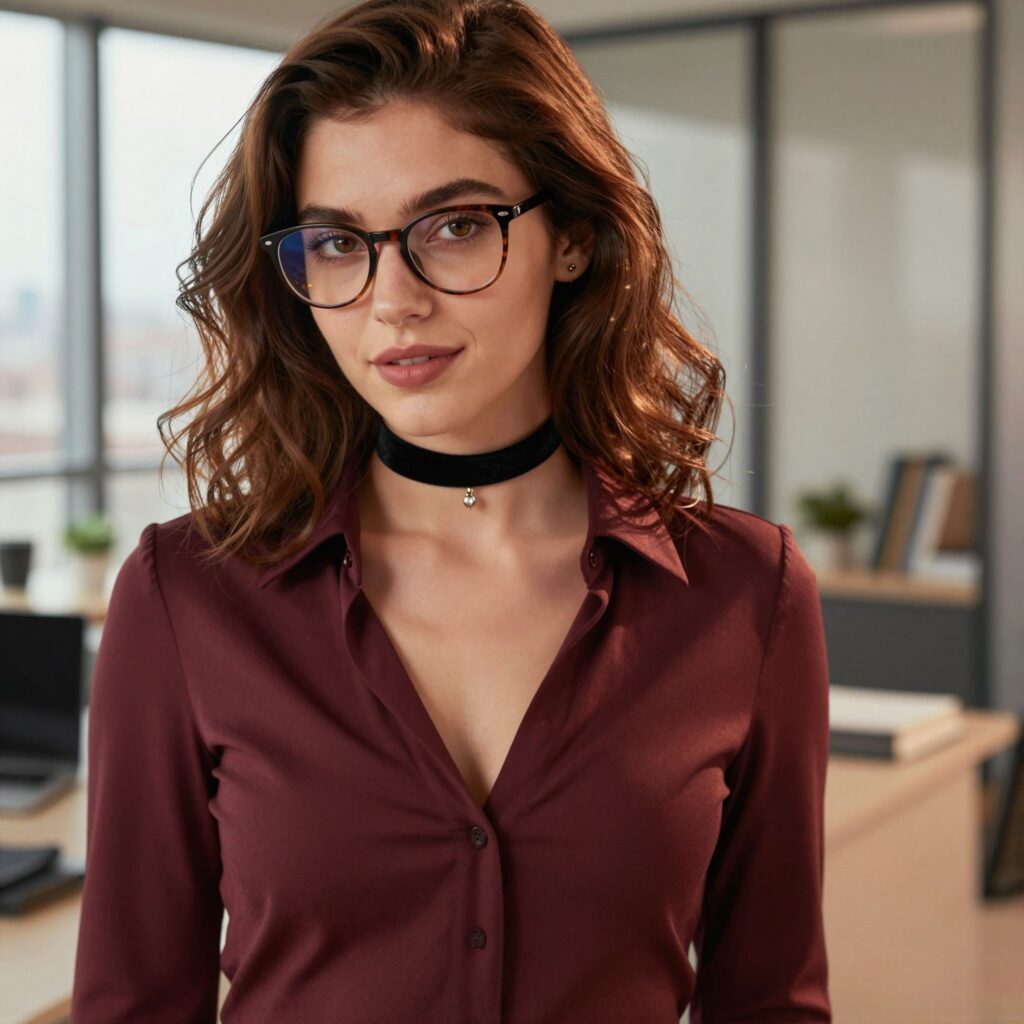
Why it works: The motion reads as a sequence the model can follow beat by beat – turn, smile, hair tuck, eye contact. Each action triggers the next. Describing the hair falling and the shadow shift gives the model physical consequences of the head turn to render, rather than relying on a vague “expression change.” The instruction to preserve the reference lighting prevents the model from inventing a new color grade mid-clip.
Example 4: Landscape Coming to Life
Prompt:
Wind rolls through the tall grass in the foreground, bending the stalks in slow waves from left to right. Clouds drift across the mountain range in the background, their shadows crawling over the green valley below. A flock of birds lifts off from the treeline on the right and scatters across the sky. The camera pushes in slowly toward the mountains, the foreground grass falling out of focus as the distant peaks sharpen. Golden hour sunlight from the left catches the tips of the grass and the edges of the clouds. The audio is steady wind through grass, distant birdsong, and the faint rush of a river somewhere below the frame. 35mm, shallow depth of field shifting with the push-in, warm natural color grade.
Input image
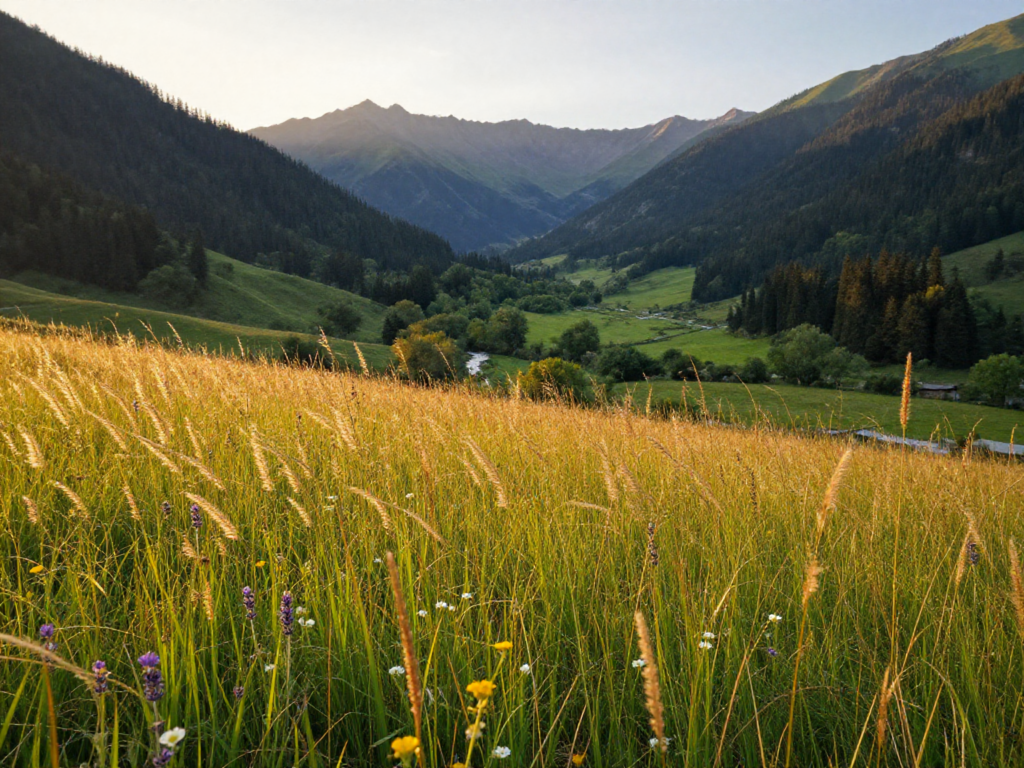
Why it works: Landscapes are one of the strongest use cases for img2video because the model only needs to add organic motion to an already composed frame. Wind through grass, drifting clouds, and flying birds are all motions the model handles reliably – no complex geometry or precise physics required. The slow push-in with shifting focus gives the clip a cinematic progression instead of feeling like a looping animated wallpaper. Describing the wind direction (left to right) and cloud shadow movement gives the model consistent motion vectors across the whole frame.
Audio-to-Video: Syncing Motion to Sound
The audio-sync endpoint takes an audio file and generates video where every motion locks to the waveform. A spoken sentence produces frame-accurate lip movement. A snare hit triggers the drummer’s arm swing at the exact right millisecond.
The model handles timing automatically. Your prompt controls performance style: mapping specific body parts to specific sounds, and describing the micro-expressions that fill the space between phrases.
Audio requirements
| Parameter | Requirement |
|---|---|
| Duration | 1-11 seconds (audio beyond 11s is rejected) |
| Formats | MP3, WAV, OGG, FLAC |
| Max file size | 20 MB |
| Best quality | Clean, normalized loudness, minimal background noise |
| Speakers | Single speaker works best. Multi-speaker audio syncs to the dominant voice |
Align your frame count to the audio duration: frames = round_to_8n+1(audio_seconds × 24). A 5-second voice clip needs ~121 frames. A 10-second music track needs 241.
Example 5: Lip-Synced Talking Portrait
Prompt:
A 35-year-old woman with long dark hair and warm brown eyes, light natural makeup, wearing a cream silk blouse, sits at a desk in a modern home office. Soft blurred bookshelves fill the background, and a warm desk lamp on the right casts late afternoon light across her face. She speaks directly to the camera, her head tilting slightly on key points, eyebrows rising for emphasis, brief smiles forming between phrases. Her eyes hold the lens, then drift down as if gathering a thought, then return. Her hands rise occasionally in open-palm gestures below her chin. The camera frames her in a medium close-up at eye level on a 50mm lens with gentle handheld movement. Warm window light from the upper left, orange fill from the desk lamp on the right, soft rim light separating her from the background. The audio is her clear, steady voice with faint room tone and the soft tick of a clock. Documentary interview feel, 35mm film grain, warm color grade.
Audio input
Why it works: Lip-sync accuracy depends on two things: audio quality and prompt detail. The model matches phonemes to mouth shapes automatically, but everything around the mouth – head tilts, eyebrow raises, gaze direction – comes from the prompt. Without these micro-motion instructions, the face renders as a still mask with a moving mouth. The medium close-up framing makes the lip-sync readable, and the static camera prevents motion blur from obscuring the articulation.
Combining Image and Audio
The audio-sync endpoint accepts an optional first_frame_image alongside the audio file. This combination solves the core problem of AI video: consistency.
Generate three text-to-video clips of “a 30-year-old woman speaking” and you’ll get three different women. Audio-to-video alone has the same issue. But pin the face with a reference image and the timing with audio, and every clip shows the same person delivering the same performance style. The image handles identity, the audio handles synchronization – your prompt only needs to describe how she performs.
The API call uses the same POST /api/v2/videos/audio-syncs endpoint. You upload both first_frame_image and audio as multipart form data, then write your prompt focused entirely on action and reaction:
The character from the reference image speaks to the camera, eyes holding the viewer with warm contact, then looking slightly off-camera to the right between phrases as if someone is sitting nearby. Her eyebrows rise on key words, a genuine smile forms on lighter moments, and her hands occasionally enter the frame in open conversational gestures. Between sentences she pauses, glances down briefly, then returns to the viewer with renewed focus. The camera frames her in a medium close-up, gently pushing in over the clip duration with imperceptible handheld shake. The lighting from the reference image is preserved throughout. The audio is her warm, articulate voice with soft room ambience. Cinematic documentary, 35mm, shallow depth of field, natural color grade.
The image already defines who and where. Direct all your prompt budget toward describing how the character responds to the audio.
Resolution and Framing Reference
LTX-2.3 supports resolutions from 512×512 to 1024×1024. Choosing the right aspect ratio matters – a talking head in 1:1 wastes half the frame on empty space, while a landscape establishing shot in 9:16 crops out the scenery you’re trying to show.
| Aspect ratio | Resolution options | Best for |
|---|---|---|
| 16:9 | 1024×576, 896×512 | Dialogue, interviews, performance, YouTube |
| 9:16 | 576×1024, 512×896 | Reels, TikTok, Stories, vertical lip-sync |
| 2.39:1 | 960×416, 1024×432 | Cinematic establishing shots, film aesthetic |
| 1:1 | 768×768, 1024×1024 | Product shots, social media thumbnails |
For audio-to-video, match your frame count to the audio duration. The formula: frames = round_to_8n+1(audio_seconds × 24). Here are the most common values:
| Audio duration | Frames |
|---|---|
| 2 seconds | 49 |
| 5 seconds | 121 |
| 8 seconds | 193 |
| 10 seconds | 241 |
A mismatch between audio length and frame count causes the model to either trim the audio or generate silent frames at the end. Neither is what you want.
Common Mistakes and How to Fix Them
“Mannequin face” in audio-to-video. The model syncs the lips automatically, but the rest of the face stays frozen unless you describe micro-expressions in the prompt. Add “subtle head nods,” “eyebrow raises on emphasis,” and “natural blinks between phrases.” Those three phrases alone are the difference between a robotic talking head and a face that feels alive.
Lip-sync offset by ~100ms. Almost always caused by a frames/audio mismatch. Recalculate using the formula above, and verify your audio is exactly the length you think it is. If the offset persists, try adding 100ms of silence to the beginning of your audio file.
Camera too fast for dialogue. Fast pans and whip movements blur the face and make lip-sync unreadable. For any scene where mouth articulation matters, keep the camera static or use a slow dolly-in. Save dynamic camera work for wide shots and musical performances.
Multi-speaker audio confusion. LTX-2.3 syncs to the dominant voice in the audio. When two voices overlap, the model picks one and the other gets ignored. Record one voice per generation and composite the clips if you need a dialogue scene.
10-second clips losing character identity. At maximum duration (241 frames), the model has to maintain consistency across a lot of generated content. Audio anchors the timeline and cuts drift in half – even a mediocre text-to-video prompt produces more coherent long clips in audio-to-video mode than without audio.
Code Examples
All three endpoints follow the same workflow: submit a job, receive a request_id, poll until the status is done, download the result.
Text-to-Video
import requests
import time

API_KEY = "your_api_key_here"
BASE = "<https://api.deapi.ai>"
HEADERS = {
    "Authorization": f"Bearer {API_KEY}",
    "Accept": "application/json",
    "Content-Type": "application/json"
}

# Submit a text-to-video job
response = requests.post(f"{BASE}/api/v2/videos/generations", headers=HEADERS, json={
    "prompt": "A lone red double-decker London bus moves slowly along a narrow "
              "cobblestone street. Victorian London on a rainy night, gaslight "
              "lanterns glowing on the corners, wet cobblestones reflecting warm "
              "orange light, Gothic architecture on both sides, thick atmospheric "
              "fog. The bus enters from the right, passes the camera, and "
              "continues into the fog. Wide establishing shot, low angle, static. "
              "Cinematic 35mm anamorphic, Kodak Vision3 500T, heavy grain.",
    "model": "Ltx2_3_22B_Dist_INT8",
    "width": 960,
    "height": 416,
    "frames": 121,
    "guidance": 1.0,
    "steps": 8,
    "seed": 42
})

request_id = response.json()["data"]["request_id"]
print(f"Job submitted: {request_id}")

# Poll for result
while True:
    status = requests.get(
        f"{BASE}/api/v2/jobs/{request_id}",
        headers=HEADERS
    ).json()

    if status["data"]["status"] == "done":
        print(f"Video ready: {status['data']['result_url']}")
        break
    elif status["data"]["status"] == "error":
        print(f"Error: {status['data']}")
        break

    print(f"Status: {status['data']['status']} ({status['data'].get('progress', 0)}%)")
    time.sleep(2)
Image-to-Video
# Animate a still image into video
with open("portrait.jpg", "rb") as img:
    response = requests.post(
        f"{BASE}/api/v2/videos/animations",
        headers={"Authorization": f"Bearer {API_KEY}", "Accept": "application/json"},
        data={
            "prompt": "The woman from the reference image turns her head slowly "
                      "to face the camera, expression shifting from neutral to a "
                      "warm confident smile. A strand of hair falls across her "
                      "forehead and she tucks it behind her ear. Eyes engage the "
                      "viewer with direct steady contact. Medium close-up, static, "
                      "50mm, shallow depth of field, 35mm film grain.",
            "model": "Ltx2_3_22B_Dist_INT8",
            "width": 576,
            "height": 1024,
            "frames": 121,
            "guidance": 1.0,
            "steps": 8,
            "seed": 42
        },
        files={
            "first_frame_image": ("portrait.jpg", img, "image/jpeg")
        }
    )

request_id = response.json()["data"]["request_id"]
# Poll with the same pattern as above
Audio-to-Video (with optional reference image)
# Generate lip-synced video from audio + reference image
with open("voice_clip.wav", "rb") as audio, open("speaker.jpg", "rb") as img:
    response = requests.post(
        f"{BASE}/api/v2/videos/audio-syncs",
        headers={"Authorization": f"Bearer {API_KEY}", "Accept": "application/json"},
        data={
            "prompt": "The character from the reference image speaks with natural "
                      "lip-sync to the audio, confident and warm. Subtle head nods "
                      "on emphasis, eyebrow raises on key words, brief smiles "
                      "between phrases. Eyes maintain engaged contact with the lens, "
                      "occasionally glancing down reflectively. Medium close-up, "
                      "static with micro-shake, 50mm, documentary interview style, "
                      "35mm, warm grade, shallow depth of field.",
            "model": "Ltx2_3_22B_Dist_INT8",
            "width": 1024,
            "height": 576,
            "frames": 121,  # Match to audio duration: round_to_8n+1(seconds * 24)
            "seed": 42
        },
        files={
            "audio": ("voice_clip.wav", audio, "audio/wav"),
            "first_frame_image": ("speaker.jpg", img, "image/jpeg")
        }
    )

request_id = response.json()["data"]["request_id"]
# Poll with the same pattern as above
Drop the first_frame_image field if you want the model to generate the character from the text prompt alone.
Prompt Phrases That Work
A quick-reference cheat sheet for audio-to-video prompts. Copy what fits your scene.
Lip-sync (speech):
- lip movements perfectly synced to each phoneme
- natural conversational pacing, not theatrical
- soft pressed-lip pauses between phrases
Micro-expressions:
- subtle eyebrow raises on key words
- small smiles forming at warm moments
- barely perceptible nod agreeing with own statements
Eye contact:
- soft engaged eye contact with the viewer
- eyes occasionally drifting slightly off-camera as if thinking
- intermittent eye contact, looking down reflectively between phrases
Beat-sync (music):
- head nodding on downbeats
- shoulder lift on every snare hit
- foot tapping on the kick drum
- body swaying with the rhythm
Reactions to sound effects:
- flinches on loud impact sounds
- head snaps toward unexpected sound
- eyes widen on dramatic sound effect
Get Started
Grab your API key from deapi.ai and start with text-to-video – one JSON payload, zero file uploads. Once that works, record a 5-10 second voice clip and run it through the audio-sync endpoint. Watching a generated character speak your words back with accurate lip-sync is the moment LTX-2.3 clicks.
Every new account gets $5 in free credits. No credit card required.