How to Extract Text from Images with AI: Receipts, Tables, and Handwriting
Users upload scanned invoices and phone photos of receipts, and your code can’t search, sort or total any of it until the text comes out of the image. That step is OCR, and current OCR models also keep headings and tables where they were on the page.
This guide shows how to run it with one API call to LightOnOCR-3-4B on deAPI. We tested it on four real documents: a 1994 supermarket receipt, a census page from 1870, a handwritten note from 1918 and a messy shopping list photographed on a phone. Below is the raw output for each one, including where the model got it wrong. OCR is billed by image size, so the guide ends with a cost table.
What LightOnOCR-3-4B returns
LightOnOCR-3-4B is an open-weight OCR model from LightOn, released under Apache 2.0. It returns Markdown, with tables written as HTML <table> markup and math as LaTeX. According to the model card, it reads both print and handwriting in many languages.
The table format matters as soon as the next step is code. Any HTML parser can turn a <table> into rows and columns, while the same numbers flattened into lines of text need regex and guesswork.
On deAPI the model accepts JPG, PNG, GIF, BMP and WebP files up to 10 MB, from 128 to 4096 px per side.
Your first OCR request in Python
The endpoint is POST /api/v2/images/ocr. It takes the image as a file upload and returns a request_id. You then poll /jobs/{request_id} until the job is done, or pass a webhook_url and let deAPI call you.
import os
import time
import requests

API = "<https://api.deapi.ai/api/v2>"
HEADERS = {
    "Authorization": f"Bearer {os.environ['DEAPI_API_KEY']}",
    "Accept": "application/json",
}

def ocr(path):
    with open(path, "rb") as f:
        response = requests.post(
            f"{API}/images/ocr",
            headers=HEADERS,
            files={"image": f},
            data={"model": "LightOnOcr_3_4B_Q8", "return_result_in_response": "true"},
        )
    response.raise_for_status()
    request_id = response.json()["data"]["request_id"]

    while True:
        job = requests.get(f"{API}/jobs/{request_id}", headers=HEADERS).json()["data"]
        if job["status"] == "done":
            return job["result"], job["price"]["amount"]
        if job["status"] == "error":
            raise RuntimeError(job["error_reason"])
        time.sleep(3)

text, cost = ocr("receipt.jpg")
print(text)
print(f"cost: ${cost}")
With return_result_in_response set to true, the extracted text lands in the result field of the job. Without it, the job returns a result_url to a file with the same text. Each finished job also reports what it cost in price.amount, which is handy for logging spend per document.
Test 1: a supermarket receipt
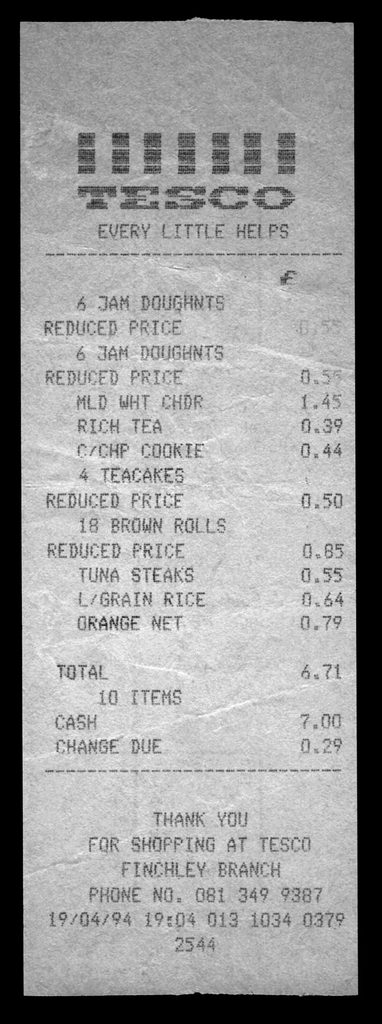
A Tesco receipt from Finchley, London, dated April 1994. Scan size 769 × 2060 px, cost $0.0138.
# TESCO

EVERY LITTLE HELPS

---

<table>
  <thead>
    <tr>
      <th>Item</th>
      <th>Price (£)</th>
    </tr>
  </thead>
  <tbody>
    <tr>
      <td>6 JAM DOUGHNTS REDUCED PRICE</td>
      <td>0.55</td>
    </tr>
    <tr>
      <td>6 JAM DOUGHNTS REDUCED PRICE</td>
      <td>0.55</td>
    </tr>
    <tr>
      <td>MLD WHT CHDR</td>
      <td>1.45</td>
    </tr>
    <tr>
      <td>RICH TEA</td>
      <td>0.39</td>
    </tr>
    <tr>
      <td>C/CHP COOKIE</td>
      <td>0.44</td>
    </tr>
    <tr>
      <td>4 TEACAKES REDUCED PRICE</td>
      <td>0.50</td>
    </tr>
    <tr>
      <td>18 BROWN ROLLS REDUCED PRICE</td>
      <td>0.85</td>
    </tr>
    <tr>
      <td>TUNA STEAKS</td>
      <td>0.55</td>
    </tr>
    <tr>
      <td>L/GRAIN RICE</td>
      <td>0.64</td>
    </tr>
    <tr>
      <td>ORANGE NET</td>
      <td>0.79</td>
    </tr>
  </tbody>
</table>


**TOTAL** 6.71
**10 ITEMS**

CASH 7.00
CHANGE DUE 0.29

---

THANK YOU
FOR SHOPPING AT TESCO
FINCHLEY BRANCH
PHONE NO. 081 349 9387
19/04/94 19:04 013 1034 0379
2544
All ten items and prices match the paper, and they add up to the printed total of 6.71. You can turn that into a free check by summing the parsed prices in code and comparing them with the total before you save the receipt.
The model also made two choices of its own. It merged each “REDUCED PRICE” line into the item above it, which is what you’d want. The column headers “Item” and “Price (£)” are its own addition, since the receipt only prints a “£” above the price column. The headers make the table easier to parse, but they come from the model and won’t match the document word for word.
Test 2: a census page with tables
A page of statistics for Louisa County, Iowa, from the 1870 census. It mixes dotted-leader lists (“Acres of Land improved …….. 144,172”) with two population tables. Scan size 1313 × 1536 px, cost $0.0174.
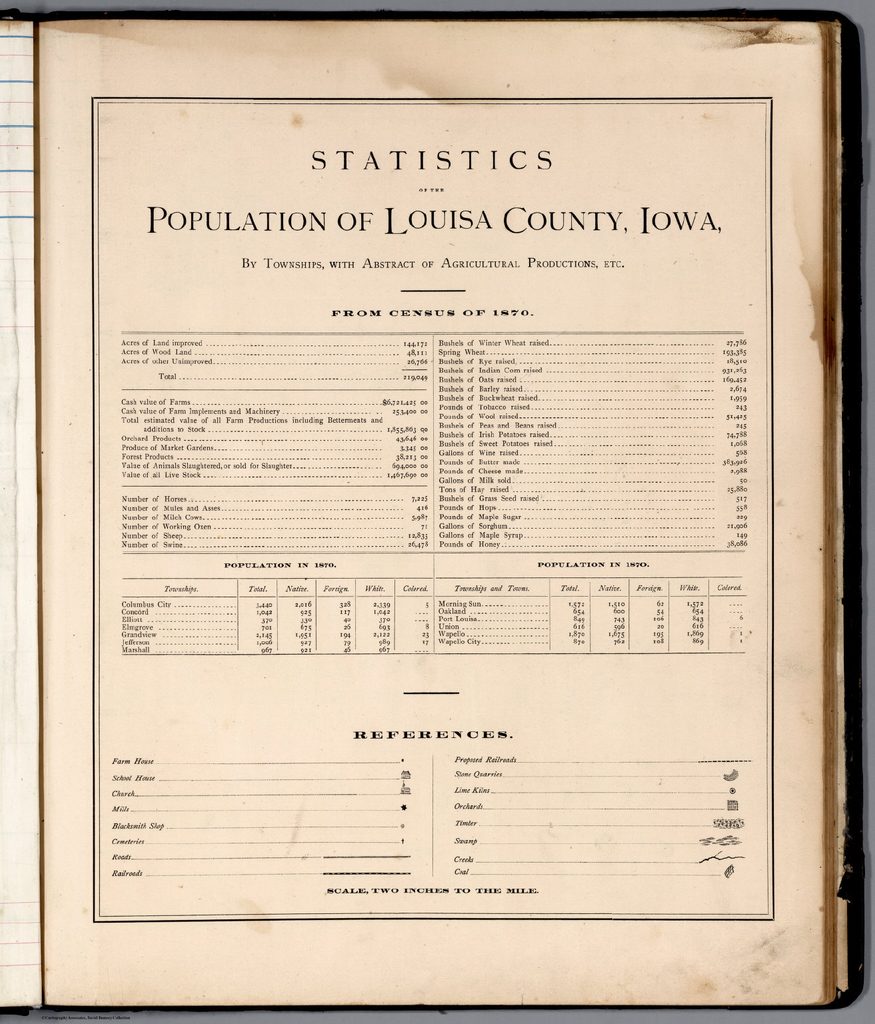
The full output runs to about 200 lines, so below we show the acreage block and the Concord row of the first population table. The rest of the page came back in the same format: 41 dotted-leader lines and two tables covering 13 townships.
Acres of Land improved .................................................. 144,172
Acres of Wood Land ....................................................... 48,111
Acres of other Unimproved ............................................. 26,766
Total ........................................................................... 219,049

...

POPULATION IN 1870.

<table>
  <tr>
    <th>Townships</th>
    <th>Total</th>
    <th>Native</th>
    <th>Foreign</th>
    <th>White</th>
    <th>Colored</th>
  </tr>
  <tr>
    <td>Concord</td>
    <td>1,042</td>
    <td>925</td>
    <td>117</td>
    <td>1,042</td>
    <td></td>
  </tr>
  ...
The model kept the dotted lists as lines of text and turned the population grids into HTML tables with their original column names. Empty cells, printed as dots on the page, came back as empty <td> elements, so every row still has six columns.
The acreage block passes the same check as the receipt: 144,172 + 48,111 + 26,766 gives the printed total of 219,049. Many printed documents carry totals like this, so use them to catch misread digits.
Test 3: a handwritten note in cursive
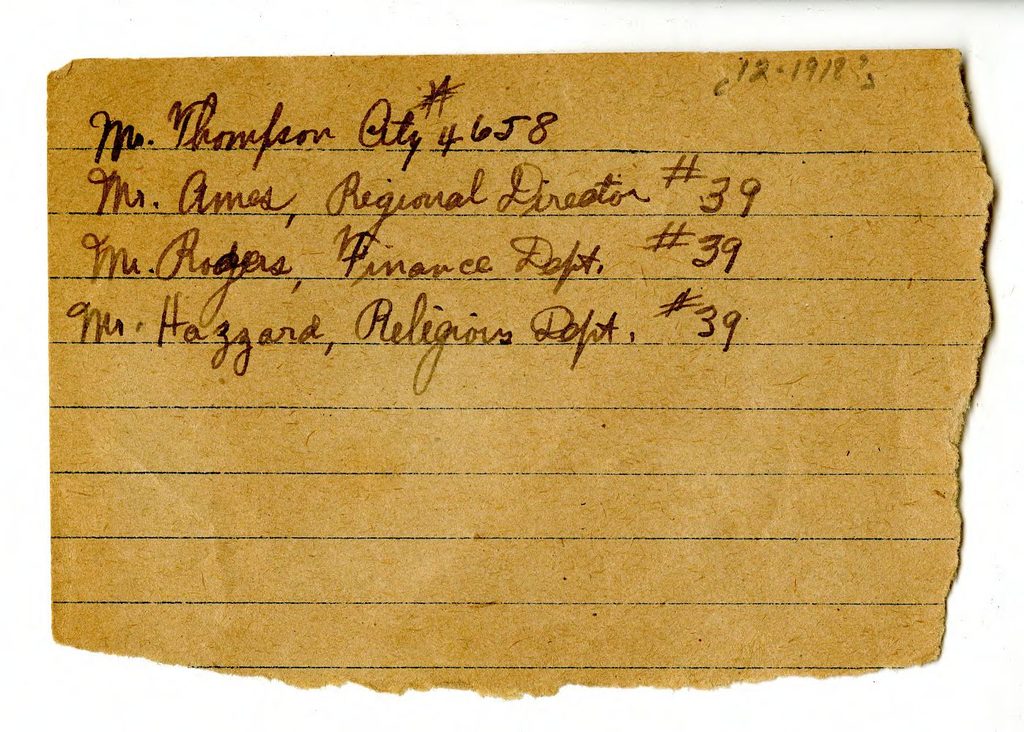
A short note from around 1918, written in ink cursive. Scan size 1397 × 999 px, cost $0.0122.
Mr. Thompson, City #4658
Mr. Ames, Regional Director #39
Mr. Rogers, Finance Dept. #39
Mr. Hazzard, Religious Dept. #39
All four lines match what we read on the page, including the reference numbers.
Test 4: a messy shopping list (where it breaks)
A German shopping list on a folded sheet of paper, photographed with a phone, with fast handwriting and some crossed-out letters. We resized the photo to 1200 × 1600 px, cost $0.0166.
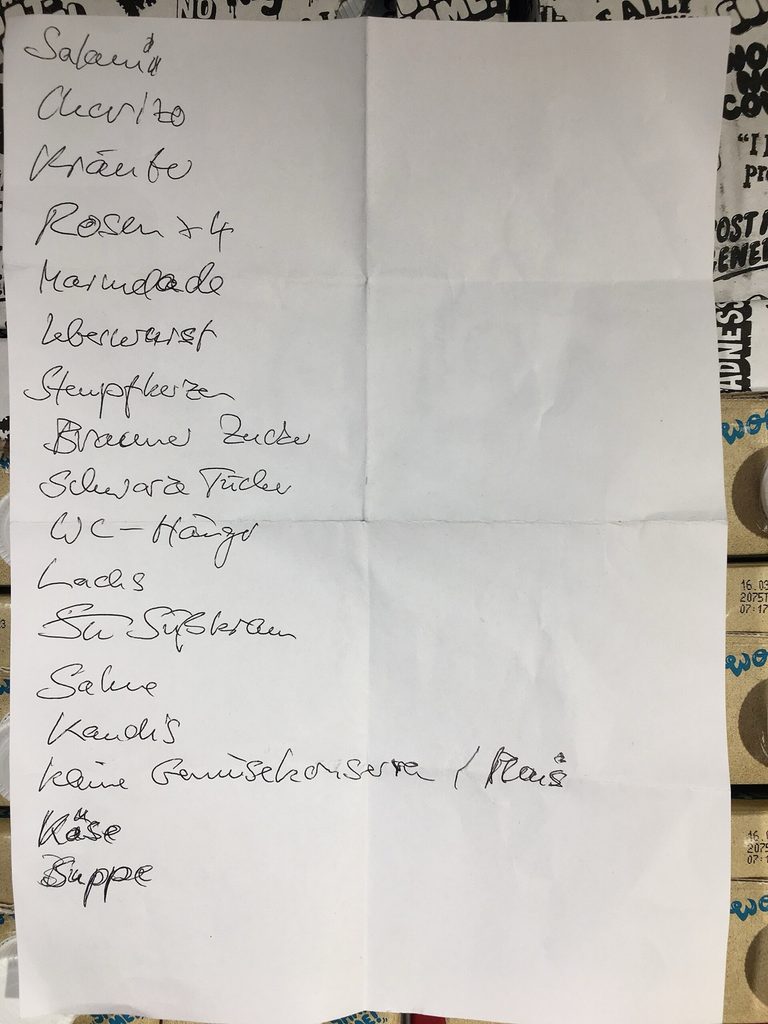
Salami, Käse, Suppe and “Rosen x 4” came back correctly. Several other lines didn’t:
| On the paper | Model output |
|---|---|
| Marmelade | Marimade |
| Brauner Zucker | Braune Zucke |
| Stumpfkerzen | Steampflecker |
| Sahne | Salute |
Some errors produced words that don’t exist, which a spellchecker would flag. Others produced real words. “Leberwurst” came back as “Leberkäse”, a different German food, and nothing in the output marks it as a guess. If your users upload handwriting, show them the extracted text next to the image and let them correct it before it reaches your database.
OCR for PDFs: render pages to images first
The endpoint takes images, so a PDF needs one extra step. pypdfium2 renders each page, and LightOn’s own examples scale the result to 2048 px on the longest side:
import pypdfium2 as pdfium

pdf = pdfium.PdfDocument("invoice.pdf")
for i, page in enumerate(pdf):
    image = page.render(scale=200 / 72).to_pil()
    image.thumbnail((2048, 2048))
    image.save(f"page_{i + 1}.png")
Each saved page then goes through the ocr() function from earlier. An A4 page at 2048 px comes out at 1448 × 2048 and costs $0.0254.
How much OCR costs
deAPI prices each OCR job by the size of the input image. The amount of text doesn’t change the price, so a blank page and a dense one of the same size cost the same.
| Image size | Price per image |
|---|---|
| 512 × 512 | $0.0027 |
| 1024 × 1024 | $0.0093 |
| 1240 × 1754 (A4 at 150 DPI) | $0.0188 |
| 1448 × 2048 (A4, longest side 2048 px) | $0.0254 |
| 2480 × 3508 (A4 at 300 DPI) | $0.0737 |
| 4096 × 4096 | $0.1417 |
Prices as of November 6, 2026. An A4 scan at 300 DPI costs almost four times as much as the same page at 150 DPI. All four documents in this guide were under 2,100 px on the long side. Scanners and phones often save much larger files, so resize before you upload unless your documents have very small print.
To quote a job before you run it, send the width and height to POST /api/v2/images/ocr/price. It returns the exact amount without processing anything.
Try it on your own documents
The fastest test is to drop one of your own scans into the image-to-text playground and look at the Markdown it returns. When you’re ready to wire it into your app, the LightOnOCR model page has the OCR API details. New accounts get $5 in free credits, which covers about 260 A4 pages at 150 DPI.
*Test images from Wikimedia Commons: Tesco grocery receipt, Finchley 1994 (public domain); Statistics of the Population of Louisa County, Iowa, 1870 (public domain, Internet Archive); handwritten note, ca. 1918, DPLA (public domain); “Handwritten shopping list in German” by Pittigrilli (CC BY-SA 4.0).*