Seedance 2.5 Prompt Guide: How to Write Prompts for Short Video Clips
A one-line prompt gets you a Seedance 2.5 clip, but the model fills in everything you left out, from the clothes to the camera move. This Seedance 2.5 prompt guide shows how to take those decisions back, using five test clips rendered at 720p. Each section pairs a prompt with the clip it produced, and the last one has the Python request and the price per clip.
What Seedance 2.5 accepts on deAPI
The Seedance 2.5 API runs under the slug seedance-2.5 and works from text alone or from a starting image. These are the limits reported by GET /api/v2/models:
| Setting | Value |
|---|---|
| Frame rate | 24 fps, fixed |
| Length | 97 to 721 frames (4 to 30 seconds) |
| Default size | 1280×720, 121 frames (5 s) |
| Max resolution | 2.09 MP, each side between 432 and 2206 px |
| Keyframes | first frame, last frame |
The model has no negative prompt field and ignores step and guidance settings, so everything you want in the clip goes into the prompt. Ask for fewer than 97 frames and the API rejects the request with a 422.
Every clip comes with an audio track. You can’t switch it off, and a silent clip would cost the same anyway.
Seedance 2.5 runs on a partner network. Access opens after your first top-up of $10 or more.
The prompt structure that works
Our first prompt was a single sentence:
An old fisherman sits on a wooden pier at dawn.
The clip looks good, but we wrote almost none of it. Seedance put a fishing rod in his hands and a harbour full of boats behind him, then picked a slow push-in on his face by itself.
For the second prompt we kept the scene and wrote down every decision in a fixed order: subject, action, camera, light and sound.
An old fisherman in a yellow raincoat sits on the edge of a wooden pier at dawn, his hands resting on his knees. He slowly turns his head toward the camera and squints at the rising sun. The camera starts wide and pushes in slowly to a medium shot of his face. Soft orange light breaks through low mist over calm grey water, with cool blue shadows on the pier boards. Sound: gentle waves against the wooden posts, distant seagulls, a soft creak of wood. Avoid on-screen text and subtitles.
The man and the light came out as written, from the yellow raincoat and the squint to the wide opening shot that closes in on his face. Only the hands ignored the prompt and ended up folded in his lap instead of on his knees, and the dialogue clip further down lost its hand position too. Give the important action to the face or the whole body, and expect the model to move the hands where it likes.
Image-to-video from a first frame
Send a still as first_frame_image and Seedance animates it. We generated ours with Z-Image Turbo: a woman on a rainy platform, with a parked train standing on the right.
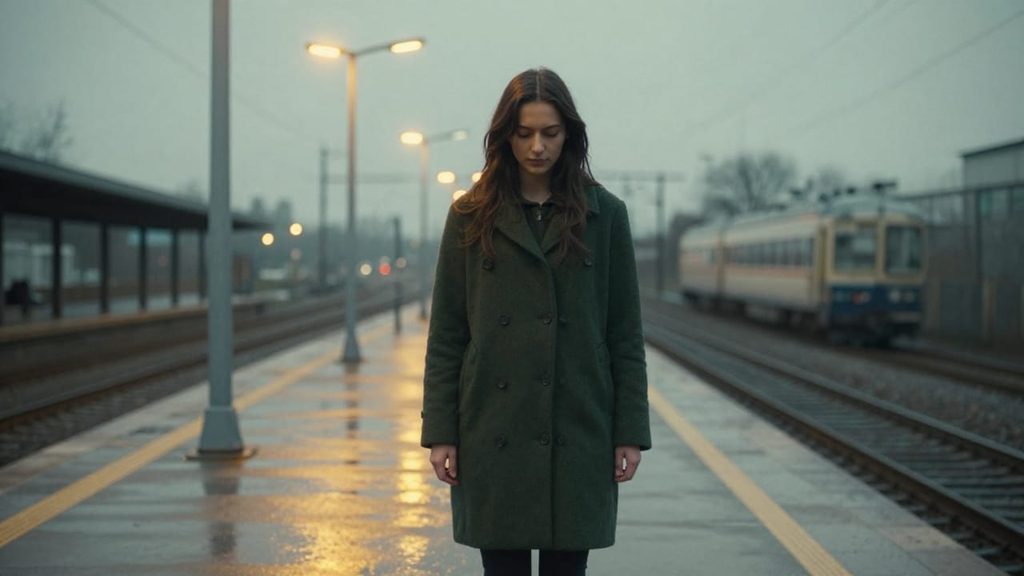
The first video prompt said “a train rushes in from the left” and “she turns her head to follow the train”. A new train did arrive from the left, but she turned toward the parked one, which had been in the frame from the start. With two trains in the shot, “the train” pointed at the wrong one.
The second prompt describes directions by the frame and gives each train its own position:
Bright headlights appear far down the empty track on the left side of the frame, and a train rushes in toward the platform. The woman turns her head to the left to watch the arriving train. The parked train on the right side of the frame stays completely still. Her hair and coat move in the gust of wind. The camera stays still. Sound: the roar of the arriving train, rain on the platform roof, a short brake squeal.
The headlights put the new train on screen within the first two seconds, so she has something to turn toward. In our test the image carried more weight than the prompt. Anything already in the frame can match any noun you write, so name objects by where they sit in the shot.
First and last frame
Add last_frame_image and the model fills the time between two stills. We built the last frame by editing the first one with Qwen Image Edit Plus, which turned afternoon into night and left the balcony and the chairs where they were.
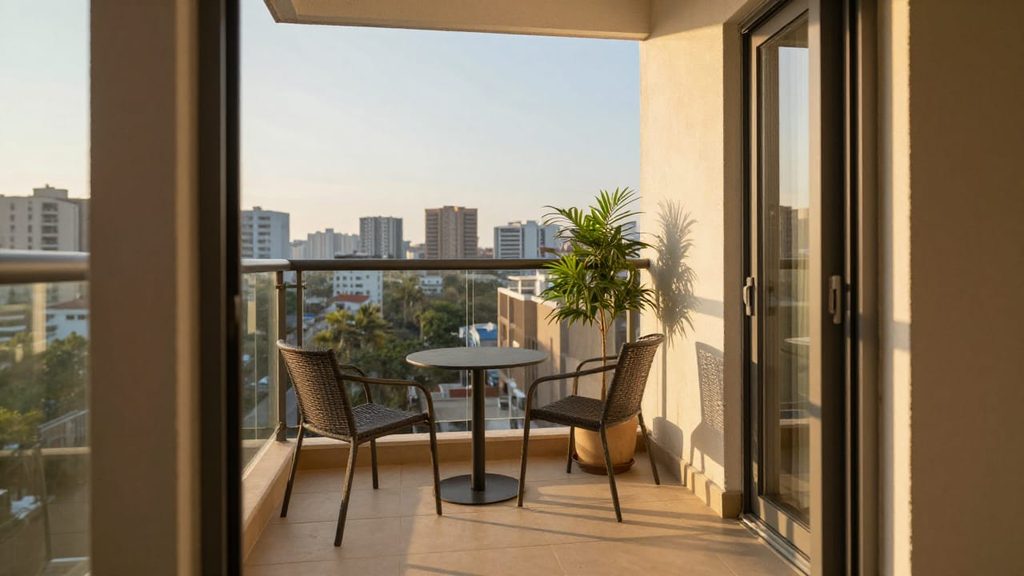
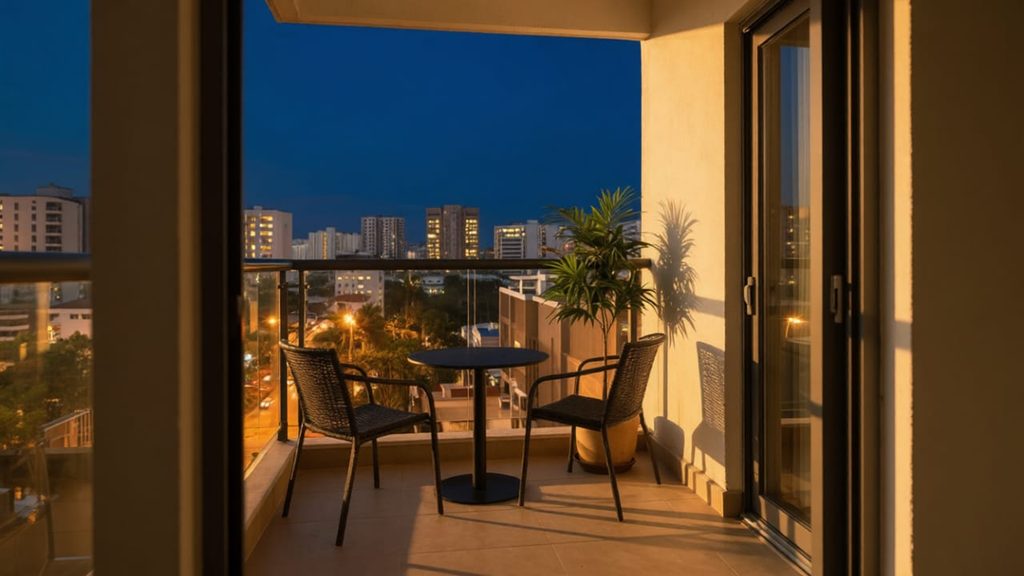
A time-lapse from late afternoon to night. The sun sets behind the skyline, the sky fades from gold to deep blue, and the city lights switch on one by one. The camera stays locked. Sound: soft city ambience that grows quieter, a distant tram.
Dialogue and sound
Write the spoken line in quotes, inside the action, and describe the voice in the sound part of the prompt:
A woman in her thirties sits at a small café table, hands flat on the table next to five full coffee cups. She looks up at the camera, raises one eyebrow and says, “I asked for one coffee.” She pauses, then smiles. The camera holds a steady medium close-up. Warm morning light from a window on the left. Sound: her calm, dry voice, quiet café chatter, a cup clinking in the background.
The woman on screen says the line clearly, in her own voice, with no separate audio track to sync.
We kept the line to five words so it fits a four-second clip with a pause after it. The table has exactly five cups, and the smile arrives on cue after the pause.
Python request and cost
Text-to-video goes to /videos/generations. Once you attach a first frame, the request moves to /videos/animations. The script below handles both and saves the finished MP4:
import os
import time

import requests

API = "<https://api.deapi.ai/api/v2>"
HEADERS = {
    "Authorization": f"Bearer {os.environ['DEAPI_API_KEY']}",
    "Accept": "application/json",
}

def generate(prompt, seconds=4, first_frame=None, last_frame=None, out="clip.mp4"):
    """Text-to-video by default; pass first_frame (and optionally last_frame) for image-to-video."""
    fields = {
        "model": "seedance-2.5",
        "prompt": prompt,
        "width": 1280,
        "height": 720,
        "fps": 24,
        "frames": seconds * 24 + 1,  # 97 frames = 4 s
        "seed": 424242,
    }
    files = {}
    if first_frame:
        files["first_frame_image"] = open(first_frame, "rb")
    if last_frame:
        files["last_frame_image"] = open(last_frame, "rb")
    endpoint = "videos/animations" if files else "videos/generations"

    response = requests.post(f"{API}/{endpoint}", headers=HEADERS, data=fields, files=files or None)
    response.raise_for_status()
    request_id = response.json()["data"]["request_id"]

    while True:
        job = requests.get(f"{API}/jobs/{request_id}", headers=HEADERS).json()["data"]
        if job["status"] == "done":
            with open(out, "wb") as f:
                f.write(requests.get(job["result_url"]).content)
            return out
        if job["status"] == "error":
            raise RuntimeError(f"{job['error_reason']} (retryable: {job['retryable']})")
        time.sleep(15)  # a 4-second clip took 3-10 minutes in our tests

if __name__ == "__main__":
    print(generate("An old fisherman sits on a wooden pier at dawn."))
The price depends on length and resolution. Prices as of October 23, 2026:
| Length | 480p | 720p | 1080p |
|---|---|---|---|
| 4 s | $0.89 | $1.90 | $4.66 |
| 5 s | $1.11 | $2.37 | $5.82 |
| 10 s | $2.21 | $4.73 | $11.64 |
| 30 s | $6.62 | $14.19 | $34.92 |
At 720p each second costs about $0.47, so a 4-second clip like the ones in this guide costs $1.90. 480p comes in at less than half that price, which makes it the cheaper place to test a prompt before rendering the final version.
Try it on your own scene
Take the prompt closest to your scene, swap in your own subject and keep the order from subject to sound. A 4-second test at 480p costs $0.89.