Ben2 AI Background Removal Guide
A Ben2 request has two fields: the image file and the word Ben2. Ask the models endpoint what else it takes and you get back a single object holding four numbers, the minimum and maximum width and height.
curl -s "<https://api.deapi.ai/api/v2/models?filter[inference_types]=img-rmbg>" \
  -H "Authorization: Bearer $DEAPI_API_KEY" \
  -H "Accept: application/json"
{
  "name": "Ben2",
  "slug": "Ben2",
  "inference_types": ["img-rmbg"],
  "status": "standard_model",
  "info": {
    "limits": {
      "min_width": 128, "max_width": 2048,
      "min_height": 128, "max_height": 2048
    }
  }
}
Most models on deAPI answer that question with a defaults block and a features block: step counts, guidance ranges, negative prompt support. Ben2 publishes neither. There is no knob at the call site.
Every decision that changes your output therefore happens before the upload. This guide covers those decisions, the errors you will hit, and what a batch costs.
What Ben2 is
Ben2 stands for Background Erase Network 2, built by Prama LLC and described in arXiv:2501.06230. Its architecture runs a base segmentation pass, then hands the result to a refiner network that only revisits pixels the base pass was unsure about. Prama calls this Confidence Guided Matting.
That second pass is the reason the model is known for hair. A single-pass segmenter has to commit to every pixel with the same budget, so it spends as much effort on the flat middle of a jacket as on the fifty strands blowing away from someone’s temple. Confidence Guided Matting lets the expensive work land where the ambiguity is.
Training ran on the DIS5k dichotomous segmentation set plus roughly 22,000 proprietary masks from Prama.
The specification, in one block
Every value below came from the live API in September 2026.
| Endpoint | POST /api/v2/images/background-removals |
| Content type | multipart/form-data |
| Required fields | image, model |
| Model slug | Ben2 |
| Accepted input formats | jpg, jpeg, png, gif, bmp, webp |
| File size | 1 KB to 10 MB |
| Dimensions | 128 to 2048 px on each side |
| Output | PNG with an alpha channel, same pixel dimensions as the input |
| Response | request_id, then poll GET /api/v2/jobs/{request_id} |
| Rate limit | 300 requests per minute on the standard tier |
The output keeps input dimensions exactly. A 2040×2040 upload returns a 2040×2040 RGBA file, and nothing is resized behind your back. TIFF is missing from the format list, which stings because it is the format a photographer is most likely to hand you.
One more property worth knowing before you build anything on top of this. Ben2 writes the alpha channel and leaves the colour data alone: pixels inside the subject come back identical to what you sent. It will not quietly sharpen, recolour, or recompress your product on the way through.
There is nothing to tune, so tune the input
With no parameters to adjust, four properties of the source image carry the entire result.
Resolution, applied in the right order. If a source image is small and you plan to upscale it anyway, upscale first and cut second. Ben2 decides edge pixels from the detail available to it, and an upscaler running on an already-cut PNG has to invent detail along a boundary that was drawn from less information. The pricing section shows what the bigger upload costs you, which is close to nothing.
One clear subject. The model produces a foreground and a background, not a labelled scene. Two people standing apart, or a product plus the hand holding it, leaves Ben2 to decide what counts as foreground. It will decide, and you will not get a vote.
Separation between subject and background. Not necessarily a white backdrop, but a difference the model can find. A grey laptop on a grey desk gives the refiner network very little to work with in exactly the region where you will be looking hardest.
Distance from the frame edge. A subject cropped tight against the border leaves no context on that side. Leave a margin where you can.
Where it holds and where it breaks
Five subjects went through the model for this guide: a portrait with loose hair, a long haired cat, an empty wine glass, a wire mesh basket, and a leather boot on a studio sweep.
Hair and fur come out as strands
The model does not draw a soft rim around a hard silhouette. Individual strands standing away from the head keep their own transparency, so the cutout composites onto a new background without the cardboard outline that gives away a bad mask. Long fur behaves the same way.
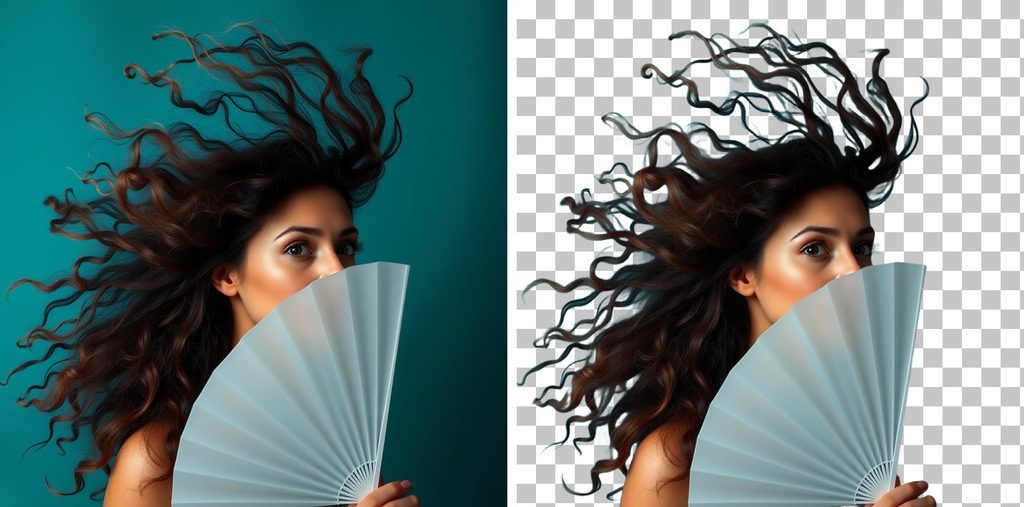
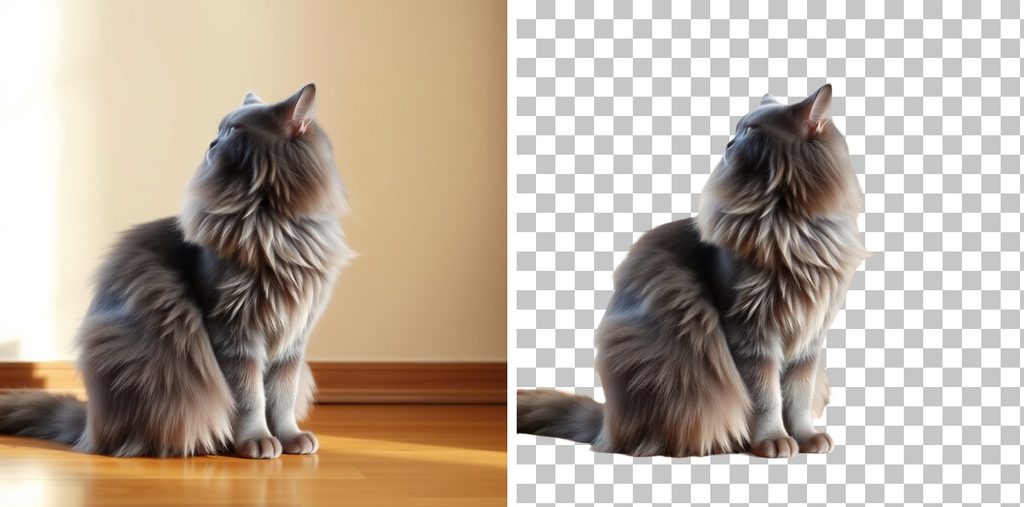
If you are cutting people or animals, this is the case Ben2 was built for.
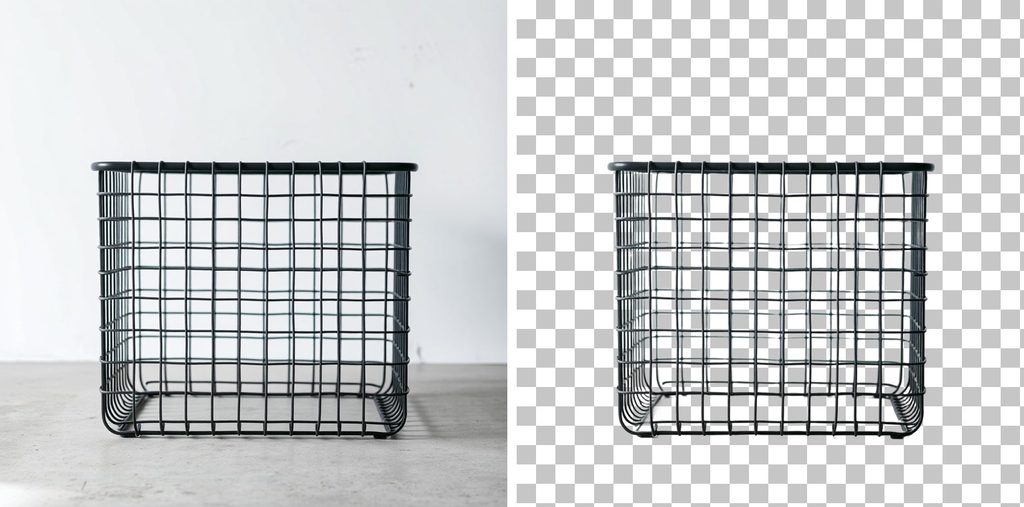
Mesh and perforations survive
A wire basket came back with its holes intact, and the background shows through the weave rather than filling into a solid shape. The model is not wrapping a convex hull around the subject and calling it done.
Glass comes back as a matte, not a solid
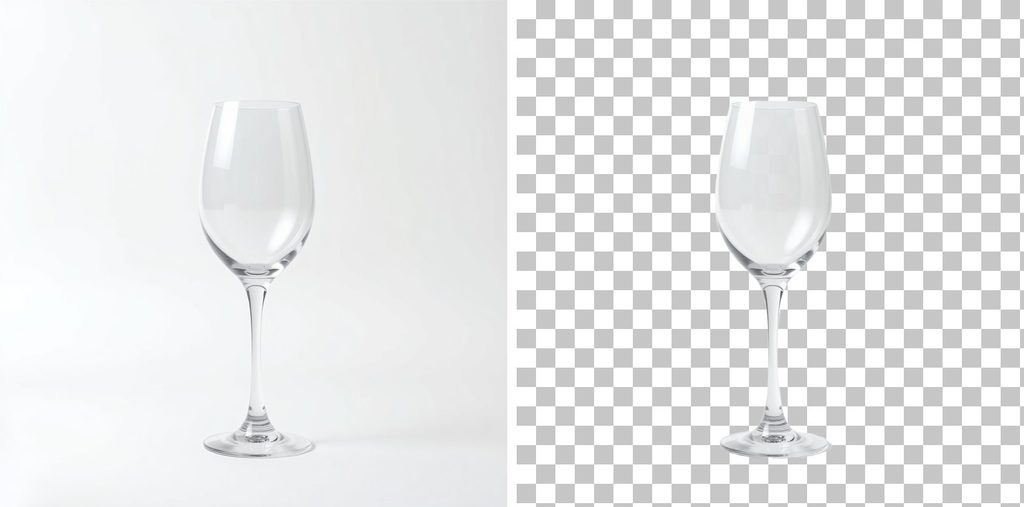
An empty wine glass on a white sweep returns with roughly half its body at intermediate transparency, which is the right answer for glass. Drop it on a new background and the material reads as material.
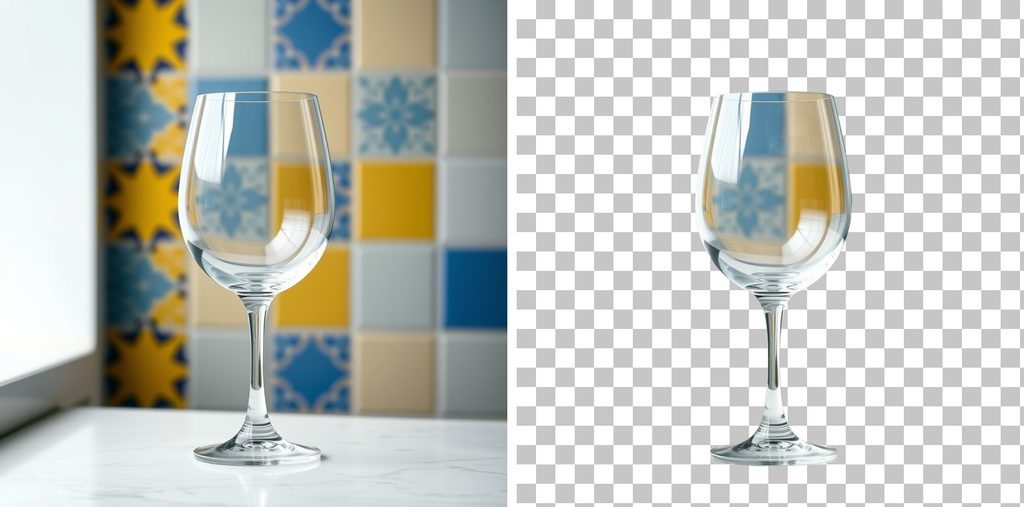
The failure appears when something is visible through the glass. Shot against a patterned tiled wall, the same glass came back carrying pieces of that wall inside the bowl. Ben2 returns a subject mask, so whatever the glass was showing gets classified as part of the glass and travels with it. Place that cutout on a clean catalogue background and the old wall is still sitting in the middle of it.
Shoot transparent products against a plain backdrop. This one cannot be fixed downstream.
Contact shadow leaves with the background
A brown leather boot stood on a studio sweep with soft shadow pooling under the sole. The cutout came back without the shadow, and the cream sole survived down to its bottom edge.
Light reaching under the product is what gives Ben2 a clean boundary at the bottom edge. Worth arranging on the shoot, because that edge is where a cutout gets judged.
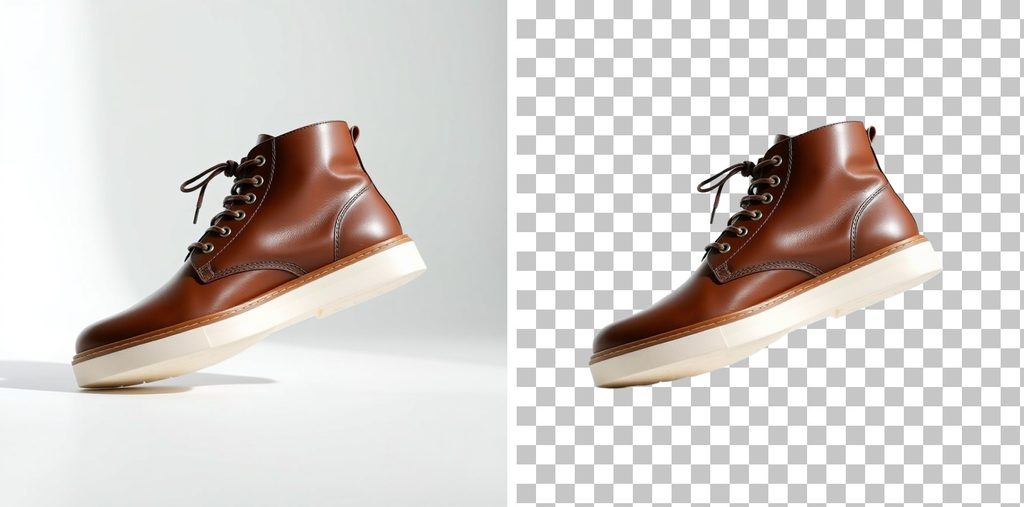
One thing to settle before you run a catalogue through: the cutout hands you the product sitting on nothing. Shoppers read a floating product as a cutout, so if the final image needs contact shadow, you are painting it back downstream.
Calling it
The endpoint is asynchronous. You post the file, you get a request_id back, and the result arrives when the job finishes.
curl -X POST "<https://api.deapi.ai/api/v2/images/background-removals>" \
  -H "Authorization: Bearer $DEAPI_API_KEY" \
  -H "Accept: application/json" \
  -F "model=Ben2" \
  -F "[email protected]"
{"data":{"request_id":"d1e4a82a-8fab-4e6e-b057-4810302634c3"}}
In Python, with polling:
import os, time, requests

API = "<https://api.deapi.ai/api/v2>"
HEADERS = {
    "Authorization": f"Bearer {os.environ['DEAPI_API_KEY']}",
    "Accept": "application/json",
}

def remove_background(path):
    with open(path, "rb") as f:
        r = requests.post(
            f"{API}/images/background-removals",
            headers=HEADERS,
            data={"model": "Ben2"},
            files={"image": f},
        )
    r.raise_for_status()
    request_id = r.json()["data"]["request_id"]

    while True:
        job = requests.get(f"{API}/jobs/{request_id}", headers=HEADERS).json()["data"]
        if job["status"] == "done":
            return job["result_url"]
        if job["status"] == "error":
            raise RuntimeError(job["error_reason"])
        time.sleep(1)

url = remove_background("product.png")
open("cutout.png", "wb").write(requests.get(url).content)
A finished job carries its own receipt. The price object comes back with is_estimated: false, so you are reading what you were charged rather than a forecast:
{
  "status": "done",
  "progress": 100,
  "result_url": "<https://results.deapi.ai/>...",
  "results_alt_formats": {
    "jpg": "<https://results.deapi.ai/.../-jpg.jpg>",
    "webp": "<https://results.deapi.ai/.../-webp.webp>"
  },
  "price": {"amount": 0.00067723, "is_estimated": false}
}
The alt format that undoes the job
results_alt_formats is convenient and it contains a trap. The webp variant carries the alpha channel. The jpg variant cannot, because JPEG has no alpha channel to carry.
Pull the jpg URL into a catalogue pipeline and every cutout you just paid for arrives with a background again. Nothing in the response marks this, both URLs sit in the same object, and the file downloads perfectly. Take result_url or take the webp.
Batch work needs webhooks
One job polls fine. Four hundred of them means four hundred open loops, and your own rate limit is the first wall you hit. Pass a webhook_url on submission and let the finished jobs come to you.
requests.post(
    f"{API}/images/background-removals",
    headers=HEADERS,
    data={"model": "Ben2", "webhook_url": "<https://your-server.com/hooks/deapi>"},
    files={"image": open("product.png", "rb")},
)
One detail for anyone moving over from the older API: v1 and v2 draw from the same rate limit bucket. Migrating does not hand you a fresh allowance, and mixed traffic counts as a single stream. Every response carries x-ratelimit-* headers, including rejected ones, so you can pace against the numbers instead of waiting to be told no.
The errors you will see
Validation runs before anything is charged, and the messages name the field.
| What you sent | What comes back |
|---|---|
| A 100×100 image | The image field must be at least 1 kilobytes. plus The image field has invalid image dimensions. |
| A 2500×2500 image | The image field has invalid image dimensions. |
| A TIFF | The image field must be a file of type: jpg, jpeg, png, gif, bmp, webp. |
model=Flux1schnell | The selected model does not support Image Remove Background. |
The dimension message is the same string whether you went under the floor or over the ceiling, so log the size you sent alongside it.
What a batch costs
The price endpoint takes width and height instead of a file, which means you can cost out an entire catalogue before uploading a single image.
curl -X POST "<https://api.deapi.ai/api/v2/images/background-removals/price>" \
  -H "Authorization: Bearer $DEAPI_API_KEY" \
  -H "Content-Type: application/json" \
  -d '{"model":"Ben2","width":1920,"height":1080}'
Measured across the usable range:
| Input size | Price per image | Images on the free $5 |
|---|---|---|
| 512×512 | $0.00026265 | ~19,000 |
| 1024×1024 | $0.00034626 | ~14,400 |
| 1920×1080 | $0.00045524 | ~11,000 |
| 2048×2048 | $0.00068071 | ~7,300 |
Read the first and last rows together. Going from 512×512 to 2048×2048 is sixteen times the pixels for 2.6 times the price. The curve also has a floor around $0.00023, low enough that a 100×100 thumbnail and a 512×512 image cost within a hundredth of a cent of each other.
That answers the ordering question from earlier. Downscaling before upload saves you approximately nothing and costs you the edge quality you came for, so send the largest version you have, up to 2048.
For comparison, remove.bg sells background removal in credits, one credit per full-resolution image. Their entry subscription is $9 a month for 40 credits, or $0.225 an image. Volume brings that down, and their largest published plan, 75,000 credits for $5,450 a month, works out to $0.073 an image. Buying credits outright without a subscription starts at $3 for three.
Set the $5 that arrives with a new deAPI account against that. It covers roughly 11,000 images at 1920×1080. The same 11,000 images cost about $2,470 on remove.bg‘s entry plan, and roughly $800 at their best committed rate.
The cutout is step one
Almost nobody wants a PNG with a hole in it. They want the product on a white catalogue background, or on a seasonal gradient, or at 4x for a print sheet. Ben2 gets you the isolation; the next call decides what fills the space.
That chain is the subject of the next piece: a phone photo in, a catalogue-ready product shot out, in three API calls.
A key takes a minute to create and arrives with $5 of credit, which covers more cutouts than most first catalogues need. Start with Ben2.