
FLUX.1 Schnell Prompting Guide: How to Write Prompts and Avoid Common Mistakes
FLUX.1 Schnell is a 12-billion-parameter image generation model from Black Forest Labs – the team behind the original Stable Diffusion. It was distilled to produce images in as few as 1-4 inference steps, which makes it one of the fastest open-source image generators available. The NF4 quantized variant runs on GPUs with as little as 6-8 GB VRAM.
But speed isn’t the only reason developers reach for Schnell. It supports LoRA style weights and renders legible text inside images – two things its newer sibling FLUX.2 Klein traded for multi-image reference. The model handles natural-language prompts up to 256 tokens and ships under Apache 2.0, so commercial use is fully permitted.
This guide covers how to write effective prompts for FLUX.1 Schnell, from parameter settings and LoRA usage to the mistakes that waste your credits.
How FLUX.1 Schnell Reads Your Prompt
FLUX.1 Schnell uses a T5+CLIP text encoder with a 256-token context window. Different architecture from FLUX.2 Klein (which runs Qwen3 at 512 tokens), but the practical takeaway is the same: write in natural language, not in tags.
The model was trained on descriptive image captions – full sentences, not comma-separated keywords. “A photo of an older woman sitting on a wooden park bench in autumn, holding a cup of tea in both hands, the setting sun lighting her face from the side” will outperform “old woman, park bench, autumn, tea, sunset, side lighting” every time.
Three things to know about how Schnell processes text:
English first. The model can parse simple concepts in other languages, but stylistic terms – lens names, lighting setups – are reliably understood only in English.
No negation. “No hat,” “not blurry,” and “without people” don’t work the way you’d expect. The model struggles with negative phrasing. Describe what should be present: “an empty forest clearing with crisp focus” instead of “a forest, no people, not blurry.”
Front-loading matters. The subject described first in your prompt gets the most attention from the encoder. Bury it after three sentences of background description and it loses presence in the output.
The Prompt Structure That Works
Here’s a framework that consistently produces strong results with Schnell:
Subject – Concrete, specific. “A 40-year-old craftsman with calloused hands” beats “a man.” Include age, clothing, distinguishing features.
Action / pose – Use the present tense or gerund form: “leaning against a stone wall, smoking a pipe.” Avoid passive voice.
Scene / background – Spatial context, ideally layered. FLUX.1 Schnell handles foreground/midground/background composition well when you describe each layer explicitly: “in the foreground a wooden cart; in the midground a cobblestone street; background – a gothic cathedral in fog.”
Style / medium – “Analog 35mm film photograph,” “oil painting in the style of Rembrandt,” “studio 3D render in Blender Cycles.” The model recognizes many photographers, painters, and camera models by name.
Lighting – The single highest-impact element in any prompt. “Rembrandt lighting,” “golden hour backlight,” “softbox from camera left” – Schnell interprets these literally. Specify source, quality, direction, and color temperature when you can.
Camera / lens / framing – “Shot on 85mm f/1.4, shallow depth of field, waist-up portrait.” Adding focal length and aperture to any composition is worth the tokens.
Mood / quality – “Cinematic, moody, warm color grade” or “hyperdetailed, professional.” One or two modifiers work. Stacking quality tags (“8k 4k ultra HD masterpiece trending on artstation”) makes outputs look over-processed. FLUX.1 produces high-quality images on its own.
Parameters: What to Set and Why
Steps
FLUX.1 Schnell was distilled using Latent Adversarial Diffusion Distillation, optimized around 4 inference steps. This isn’t a suggestion – it’s how the model was built.
- 1-2 steps – Fast previews for prompt iteration. Details may smear, but composition and color are visible enough to decide whether your prompt is heading in the right direction.
- 4 steps – The sweet spot. This is the step count the distillation was optimized for.
- 6-10 steps – Marginal gains at best. More steps does not mean better images with a distilled model, and in some cases you’ll see artefacts that weren’t there at 4.
Resolution
The model accepts anything from 256×256 to 2048×2048 in 128px increments. Practical choices:
| Ratio | Resolution | Use case |
|---|---|---|
| 1:1 | 1024×1024 | Standard square, full detail |
| 4:3 | 1152×896 | Editorial, landscape |
| 3:4 | 896×1152 | Portrait, vertical |
| 16:9 | 1344×768 | Wallpapers, widescreen |
| 9:16 | 768×1344 | Stories, vertical video covers |
Above ~1536px on a single axis, you may see character duplicates or repeating background patterns. For larger output, generate at 1024 and upscale with a dedicated tool.
Negative Prompt
FLUX.1 Schnell is guidance-distilled, so negative prompts have a much weaker effect than in Stable Diffusion 1.5 or SDXL. Start without one. If a specific defect keeps appearing across generations – extra fingers, watermarks – add that specific term to the negative prompt. Generic dumps (“blurry, low quality, worst quality, bad anatomy, ugly”) are noise here and can actually degrade output quality.
LoRAs: Custom Style Weights
FLUX.1 Schnell supports LoRAs (Low-Rank Adaptations) – small trained weight files that shift the model’s visual style or introduce specific characters. If you have a LoRA you’d like to run through deAPI, reach out to us.
Five Example Prompts
1. Photorealistic Portrait
An editorial portrait of a 60-year-old Sicilian fisherman with a sun-weathered face, deep-set dark eyes and a three-day grey stubble, standing on a small wooden boat at dawn, wearing a navy-blue wool sweater with visible repairs at the elbows. Soft golden rim light from behind, diffused overcast front fill, shot on a Leica M11 with a 75mm f/1.4 Summilux, shallow depth of field, muted warm color grade, visible film grain, photographed for a National Geographic feature.
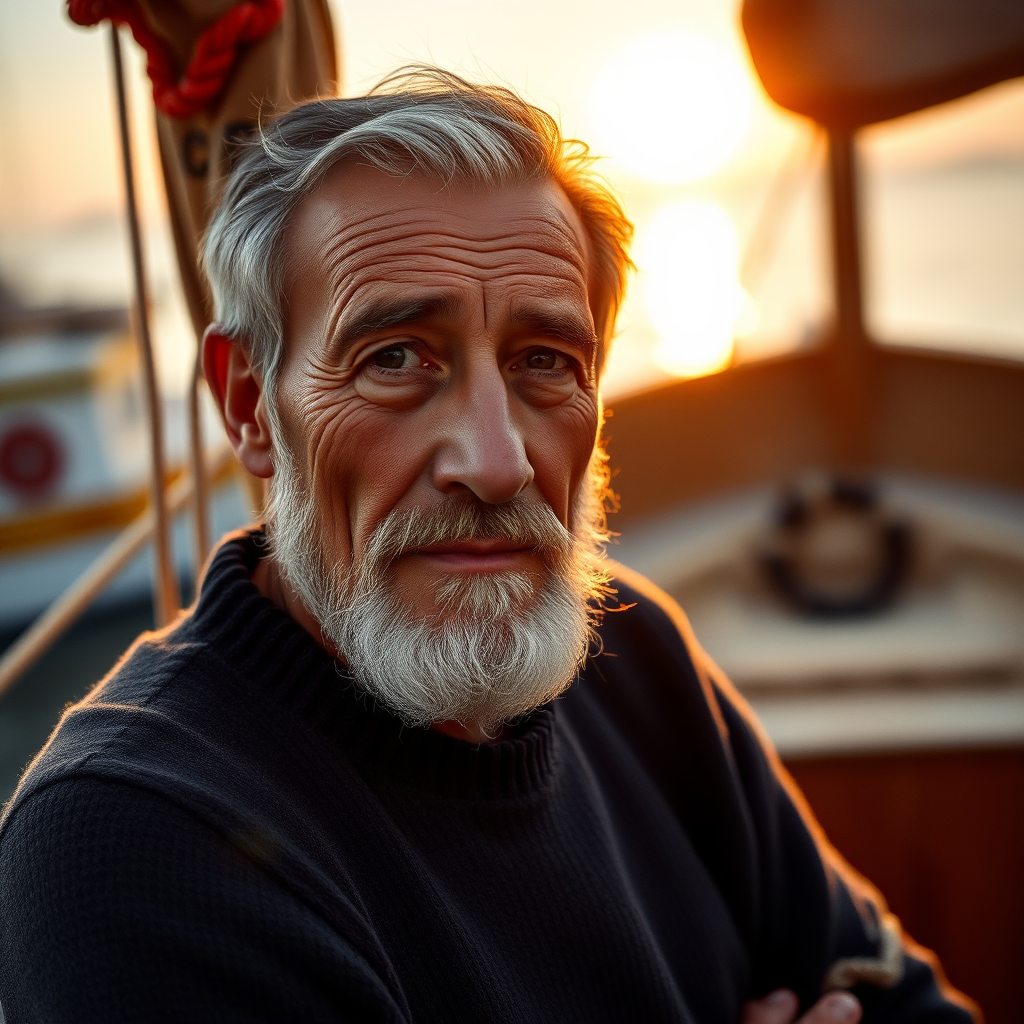
Every element of the framework is here: detailed subject with age and clothing, scene, two-source lighting, specific camera and lens. FLUX.1 Schnell renders aged skin textures and knit fabric particularly well when you name the materials (“wool sweater with visible repairs” rather than just “sweater”).
2. Illustration (Ghibli-Inspired)
A hand-painted ghibli-inspired illustration of a young witch apprentice flying on a broom above a coastal town at dusk, her long red hair trailing in the wind, a black cat clinging to her shoulder, warm orange lanterns glowing in the houses below, soft watercolor textures, visible brush strokes, pastel color palette, cinematic composition with the moon rising on the right side of the frame.

“Ghibli-inspired” combined with “watercolor textures” and “visible brush strokes” captures the aesthetic without copying a specific artist’s work. Schnell handles soft illustration styles better than hard anime line art – for that, dedicated anime models are a stronger choice.
3. Product Shot with Text
Studio packshot photograph of a minimalist matte-black skincare bottle with the label “AURORA” in clean white serif typography, standing on a smooth white marble surface, soft beauty-dish light from front-left at 45 degrees, subtle reflection beneath the bottle, seamless neutral light-grey background, shot on a Phase One IQ4 with 80mm lens at f/8, centered composition, commercial product photography.
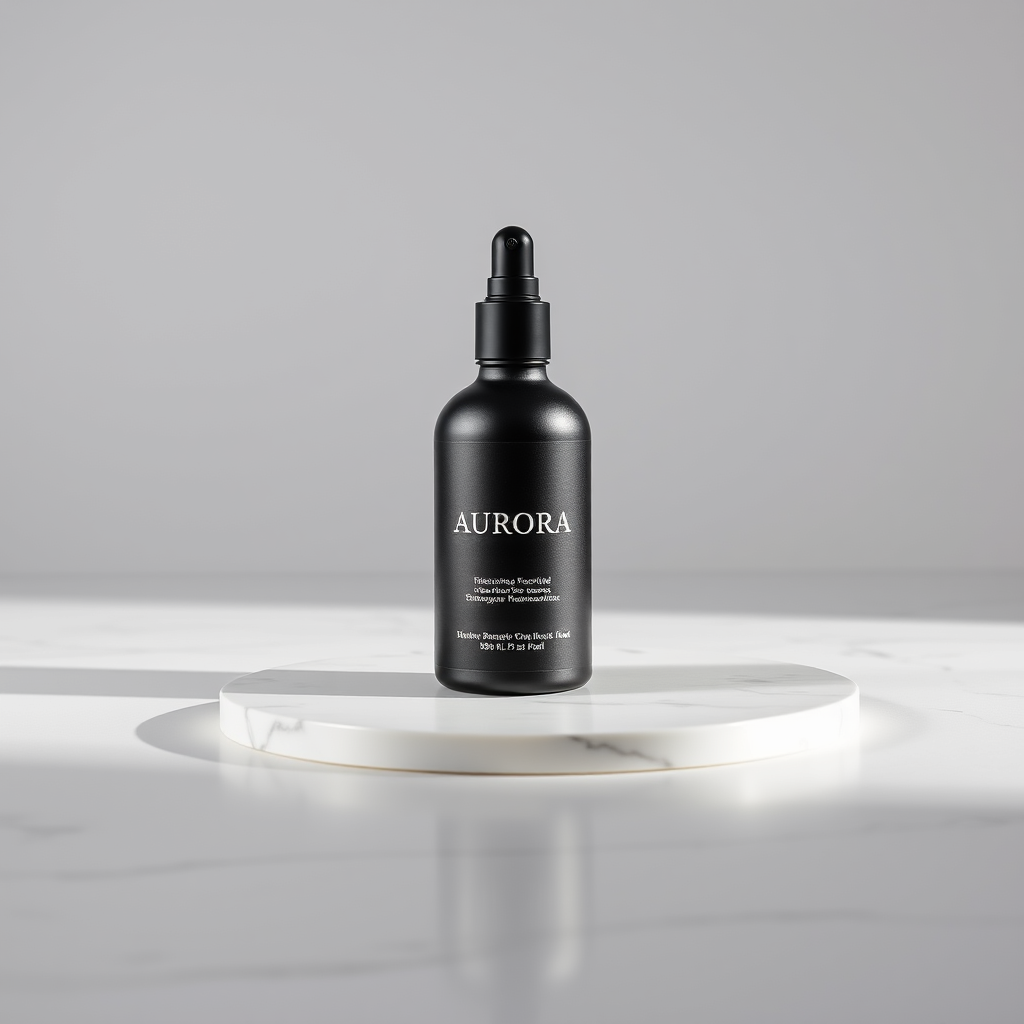
This prompt tests one of Schnell’s strongest capabilities: rendering readable text on objects. “AURORA” in quotes, described with a specific font style (“clean white serif”) and placement, gives the model enough constraints to get the typography right. Photographer-grade lighting terms like “beauty-dish” and “45 degrees” are interpreted literally.
4. In-Image Text (Vintage Sign)
A vintage enamel café sign hanging from a wrought-iron bracket on a Parisian street, the sign reads “CAFÉ DE LA LUNE” in elegant gold hand-painted lettering on a deep navy background, slightly weathered with realistic chipped edges, warm evening street light, shallow depth of field, shot on 50mm at f/2, raindrops on the sign surface, cinematic.
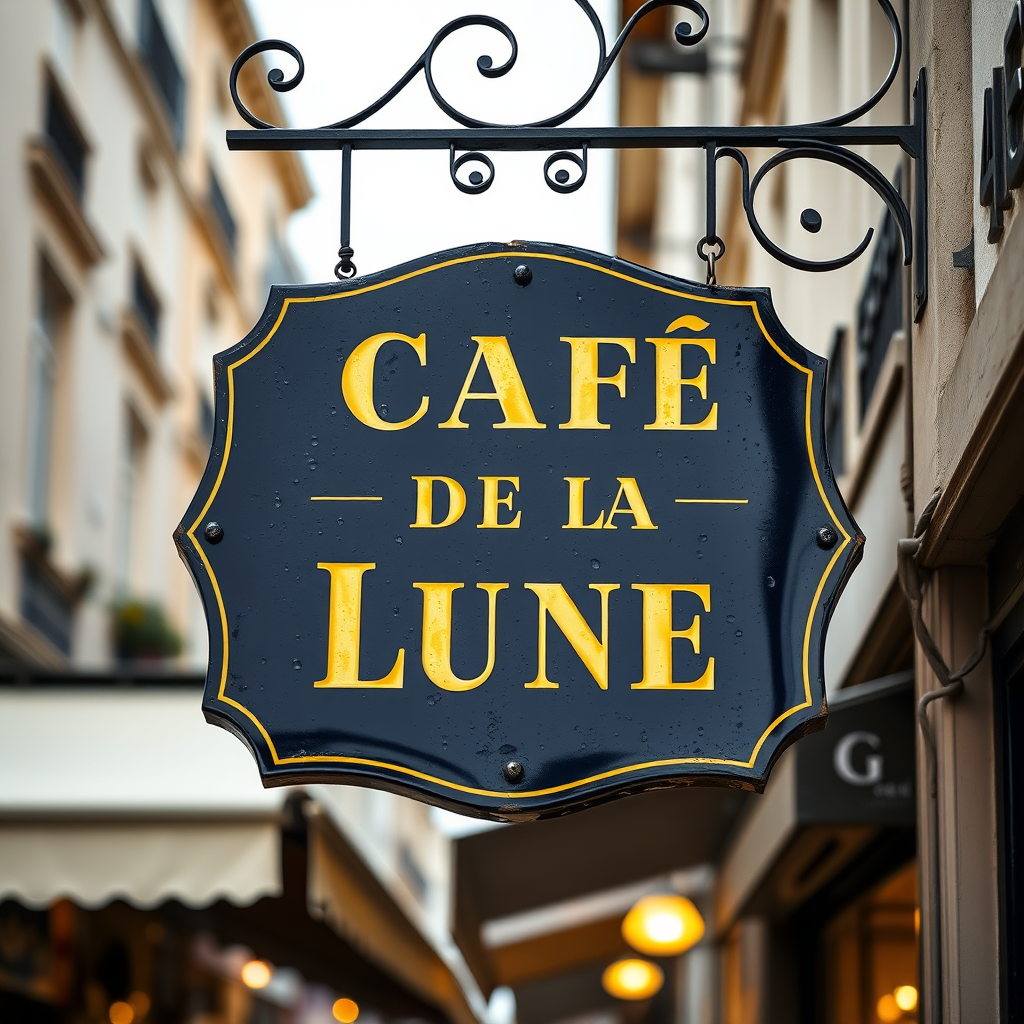
FLUX.1 Schnell is one of the few open-source models that renders multi-word text correctly. The formula: put the text in quotes, use UPPERCASE where possible, describe the typography style, and stay under six words. Beyond that length, spelling errors grow quickly.
5. Complex Layered Scene
A cozy home library interior at 4 PM on a rainy autumn afternoon: in the foreground, a tortoiseshell cat sleeping on a burgundy leather armchair next to a brass reading lamp with a green shade; on the left, floor-to-ceiling walnut bookshelves filled with worn leather-bound books and a globe on one shelf; in the background, a large window with rain streaks showing a blurred garden outside; a half-finished cup of tea and an open novel on a small side table; warm tungsten light mixed with cool blue window light, shot on 35mm f/2, wide editorial photograph, hyperdetailed.
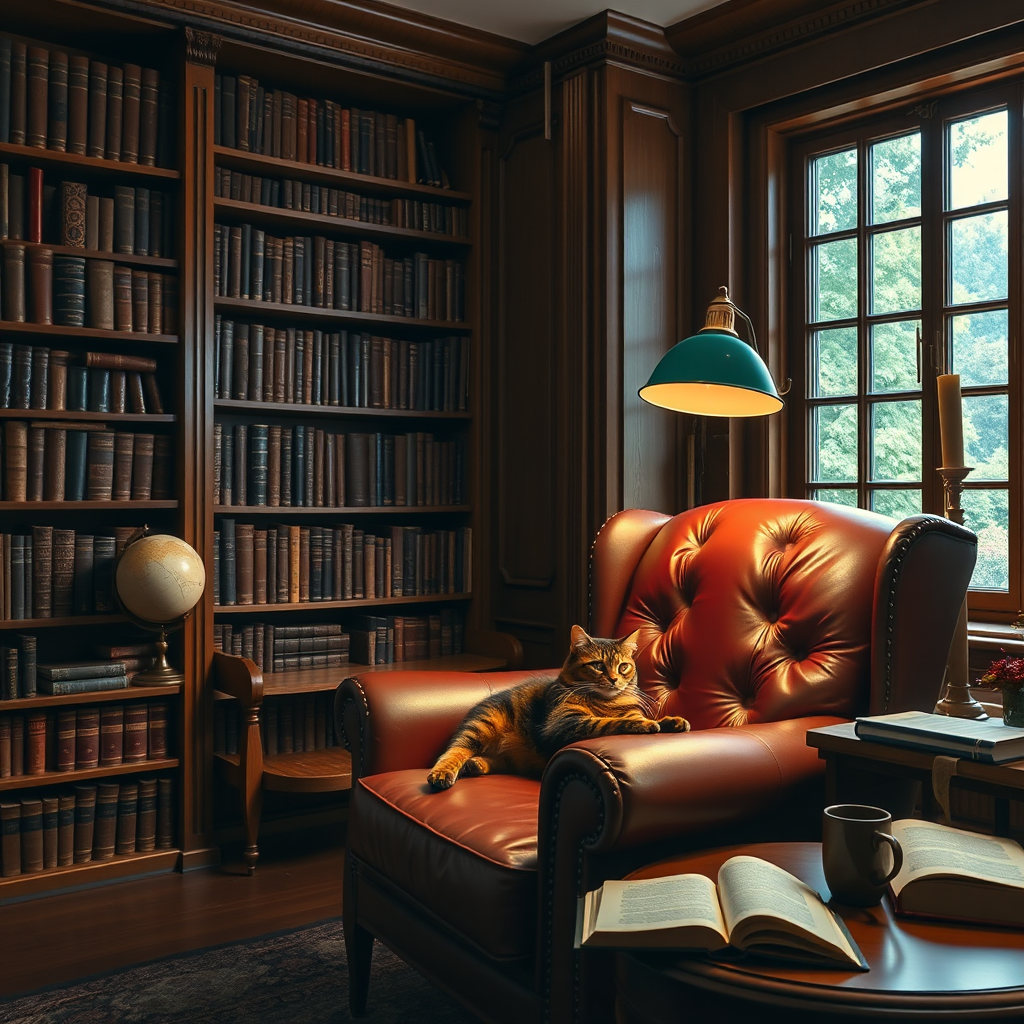
Splitting the scene into foreground, midground, and background dramatically improves spatial coherence. Mixing two light temperatures (warm tungsten inside, cool daylight through the window) adds depth that a single light source can’t match. Name your materials: “burgundy leather,” “walnut bookshelves,” “brass reading lamp” – each activates a different texture in the model’s training.
Common Mistakes
Quality tag spam. “Masterpiece, best quality, 8k, ultra HD, trending on artstation” worked in Stable Diffusion 1.5. In FLUX.1 Schnell, it adds noise and makes outputs look over-processed. One or two quality modifiers inside a natural sentence is enough.
Negations as instructions. “A forest, no people, not blurry, without animals” confuses the model. Rephrase positively: “An empty deep forest clearing with crisp focus, only trees and moss visible.”
Steps above 4. Schnell was distilled for 1-4 steps. Setting it to 20 burns credits without improving quality – and often makes things worse.
Long text in images will garble. “A billboard that reads: Welcome to our beautiful seaside town, enjoy your stay” produces unreadable letters. Keep it short, quoted, uppercase: “A billboard with bold text ‘WELCOME TO SEASIDE'”.
Non-English prompts lose nuance. Simple subjects translate fine, but photography vocabulary and art references only work reliably in English.
Quick Reference
Photographer names as style shortcuts. “In the style of Annie Leibovitz” gives you celebrity-portrait lighting and posing in a single phrase. The model recognizes dozens of photographers – try “Steve McCurry” for documentary warmth or “Gregory Crewdson” when you want something cinematic and unsettling.
Framing cues guide composition. “Waist-up,” “extreme close-up,” “wide establishing shot,” “bird’s eye view” – these terms directly control how the model crops and composes the image.
Two people need separate descriptions. “On the left, a young woman in a red dress; on the right, an older man in a grey suit, both facing each other at a café table.” Without positional cues, FLUX tends to merge features between subjects.
In-image text rules. Put the text in quotes, use UPPERCASE, and describe the font (“bold sans-serif,” “neon cursive”). Stay under six words.
Seed lock for iteration. When a result is close but not right, save the seed and refine the prompt with the same seed. Schnell is unusually stable under fixed-seed iteration – composition stays consistent while you adjust details.
Generate Your First Image with deAPI
Here’s a curl request that generates an image with FLUX.1 Schnell through the deAPI API (v2):
curl -X POST "<https://api.deapi.ai/api/v2/images/generations>" \
  -H "Authorization: Bearer $DEAPI_API_KEY" \
  -H "Content-Type: application/json" \
  -H "Accept: application/json" \
  -d '{
    "prompt": "An editorial portrait of a young ceramicist with clay-dusted forearms, standing in her workshop surrounded by drying pottery on wooden shelves, soft north-facing window light from camera left, shot on 85mm f/1.8, shallow depth of field, warm earthy tones, fine film grain",
    "model": "Flux1schnell",
    "width": 1024,
    "height": 1024,
    "guidance": 0,
    "steps": 4,
    "seed": -1
  }'
The response returns a request_id. Poll GET /api/v2/jobs/{request_id} to retrieve your finished image.
Sign up at deapi.ai to get $5 in free credits – no credit card required. Full API documentation is available at docs.deapi.ai.