Z-Anime Prompting Guide: Settings, Resolutions, and Example Prompts
You already know how to prompt Z-Image – natural language, no tag lists. Z-Anime follows the same principle, but the model was fully fine-tuned for anime-style generation from the ground up. A dedicated 6-billion-parameter model trained specifically on anime aesthetics.
That distinction matters. LoRA merges inherit the base model’s biases and often struggle with consistency across different character types. A full fine-tune reshapes the entire weight space, which means Z-Anime handles diverse anime styles – from soft shoujo illustrations to sharp mecha designs – without defaulting to a single “anime look.”
Below: what’s different from Z-Image, the settings you need, and three prompts ready for a deAPI API call.
What Changes from Z-Image
If you’ve read our Z-Image Turbo prompting guide, most of what you learned still applies. Write in sentences, and front-load the details that matter most.
Three things work differently.
CFG stays at 1.0. The Distill-8-Step variant was distilled with guidance baked into the weights, so pushing above 1.5 introduces artifacts. The playground handles this automatically. If you’re using the API directly, set the guidance parameter to 1.0.
Negative prompts have limited effect. At this distillation level, the model barely responds to negative prompt text. Instead of writing a wall of exclusions, put your constraints directly into the positive prompt: “clean linework, correct hand anatomy, no watermark.” That steering is far more effective here.
Anime-specific vocabulary unlocks better results. Z-Image responds well to photography terms like “85mm f/1.4” and “three-point studio lighting.” Z-Anime responds to illustration vocabulary instead: “cel shading” and “expressive eyes with reflections” will get you further than any lens specification.
Resolution Guide
Aspect ratio shapes composition more than raw pixel count. These presets are optimized for Z-Anime’s training distribution:
| Use Case | Resolution | When to Use |
|---|---|---|
| Character portrait | 832 × 1216 | Upper body, face focus, profile art |
| Landscape / scene | 1216 × 832 | Environments, wide establishing shots |
| Square | 1024 × 1024 | Versatile default, social media posts |
| Full body / wallpaper | 768 × 1344 | Standing poses, outfit showcases |
| Cinematic / wide | 1920 × 1088 | Panoramic scenes, desktop wallpapers |
| Detailed portrait | 1024 × 1536 | When you need maximum face and expression detail |
The supported range spans 512×512 to 2048×2048 in 16-pixel steps. Stay within these presets for the most consistent output.
Z-Anime Example Prompts
Each prompt targets a different anime use case. All tested at 8 steps, CFG 1.0.
1. Character Portrait
A detailed anime portrait of a young woman with long dark blue hair and amber eyes, wearing a high-collared white military coat with gold epaulettes and a black undershirt. Soft rim lighting from behind highlights individual hair strands. Her expression is calm but alert, with detailed eye reflections showing a window. Clean linework, professional anime illustration quality, slight film grain overlay.
Resolution: 832 × 1216
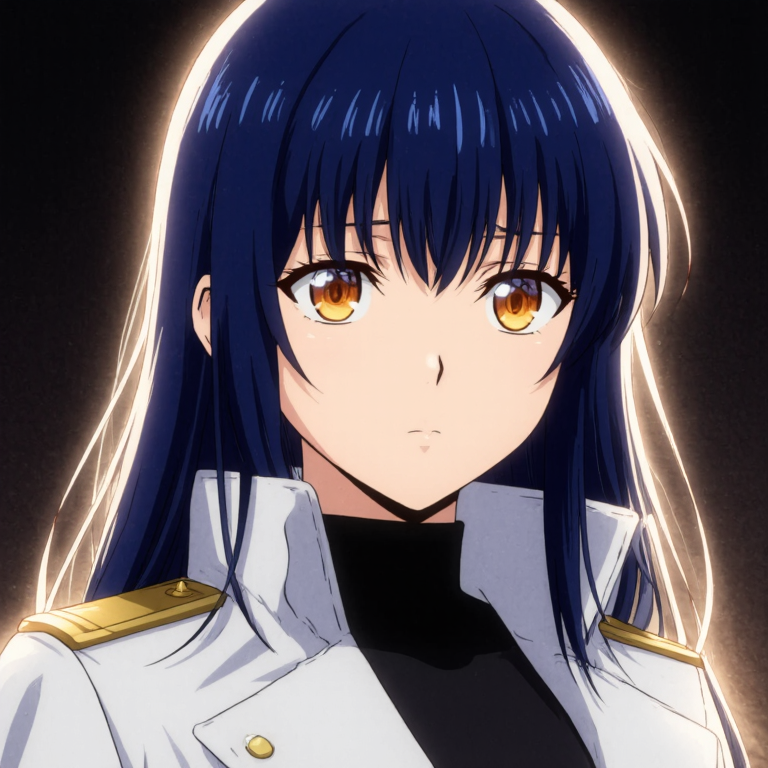
Why it works: The prompt layers physical appearance with lighting direction and a specific mood. Mentioning “detailed eye reflections showing a window” gives Z-Anime a concrete anchor for the eyes instead of generic “beautiful eyes.” The film grain overlay at the end adds texture without overwhelming the anime aesthetic.
Try changing: Swap “calm but alert” for a stronger emotion – “barely holding back tears” or “mid-laugh with closed eyes” – and watch how the model adjusts the entire face composition around that expression.
2. Action Scene
Dynamic anime battle scene, a swordsman mid-leap above a rooftop, his torn black cloak trailing behind him. Below, rain-soaked city streets reflect orange lantern light. Dramatic low angle looking up, motion blur on the cloak edges, speed lines radiating from the character’s sword arm. Particle effects of water droplets frozen mid-air. High contrast lighting, deep shadows, detailed shading on armor pieces. Cinematic anime composition.
Resolution: 1024 × 1024 or 1216 × 832
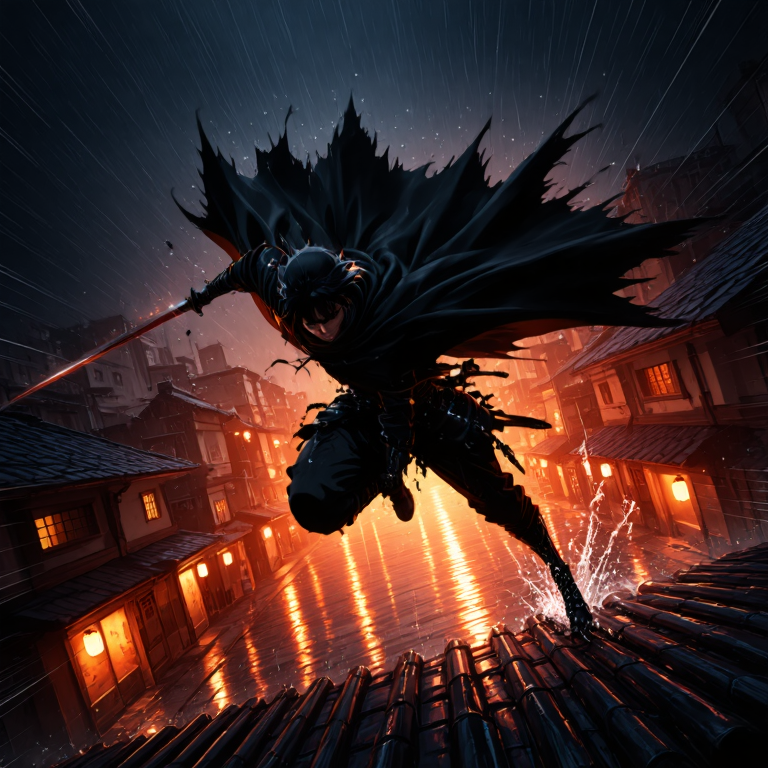
Why it works: Action prompts need two things: a frozen moment and visual energy. “Mid-leap” tells the model the exact point in movement to capture. Motion cues like “trailing behind” and “frozen mid-air” layer kinetic tension without asking the model to render actual animation. The contrast between orange lantern light and deep shadows is what creates depth here – flat lighting would kill this composition.
Try changing: Replace the swordsman with a mecha pilot ejecting from a cockpit. The core structure – a character caught mid-action inside a specific environment – transfers across genres.
3. Background / Environment
Anime background art of an abandoned greenhouse overtaken by flowering vines, late afternoon sunlight streaming through cracked glass panels and casting long golden light beams across overgrown stone pathways. A rusted watering can sits on a mossy wooden bench in the foreground. Dust particles visible in the light shafts. Studio Ghibli-inspired environment, painted background quality, warm muted color palette with green and amber tones.
Resolution: 1216 × 832 or 1920 × 1088
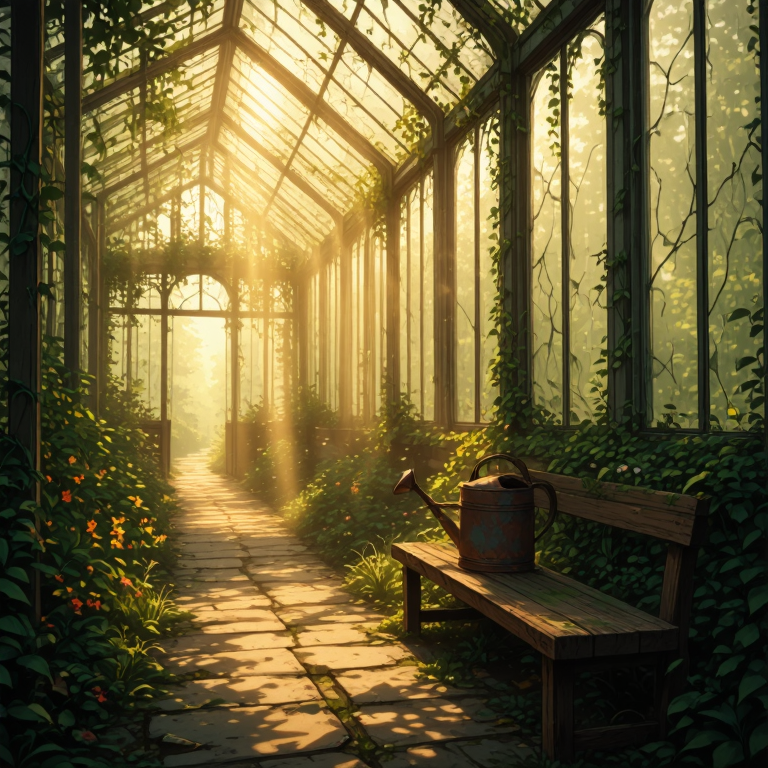
Why it works: Environment prompts benefit from a focal object (“rusted watering can on a mossy bench”) that gives the composition a resting point. Without it, wide scenes tend to feel empty. The “Studio Ghibli-inspired” tag works here because it’s a well-represented style in anime training data, but treat it as a starting direction rather than a guarantee. Atmospheric details do most of the heavy lifting – the dust particles and light beams sell the mood more than any style tag would.
Try changing: Shift the time of day to “blue hour twilight” or “overcast morning fog” and the entire mood transforms. Environment prompts are the most responsive to lighting changes.
Pricing
A single 1024×1024 image at 8 steps costs $0.00961. Drop to 4 steps for faster iteration and the price falls to $0.00669. At 512×512 resolution, you’re looking at $0.0034 per image – roughly 1,400 generations from the free $5 credit.
Full pricing table with all resolutions: deapi.ai/pricing
Try It
Paste any of these prompts into the Z-Anime playground – pick a resolution from the table above and hit generate. Your first images are covered by the $5 free credit, enough to test dozens of prompts before deciding if the model fits your pipeline.
For API integration, here’s a ready-to-use Python snippet:
import requests

response = requests.post(
    "<https://api.deapi.ai/api/v1/client/txt2img>",
    headers={
        "Authorization": "Bearer YOUR_API_KEY",
        "Accept": "application/json"
    },
    json={
        "prompt": "A detailed anime portrait of a young woman with long dark blue hair and amber eyes, wearing a high-collared white military coat. Soft rim lighting from behind highlights individual hair strands. Clean linework, professional anime illustration quality.",
        "model": "ZAnimeDistill_8Step_INT8",
        "width": 832,
        "height": 1216,
        "guidance": 1.0,
        "steps": 8,
        "seed": 42
    }
)

request_id = response.json()["data"]["request_id"]
Poll GET /api/v1/client/request-status/{request_id} for results. Full API docs: docs.deapi.ai.